
Pack your mod into a VPK
Turn your compiled files into a pakNN_dir.vpk with Source 2 Viewer or CSDK 12, check the paths inside, and pick the right number.
A Deadlock mod is one VPK file with your compiled files at the same paths the game uses. This page shows how to build it, check it, and name it. First you need compiled files from a CSDK 12 addon: see Set up your creator tools.
What you need

Your compiled files are in your addon's game folder: Reduced_CSDK_12/game/citadel_addons/<addon>/. For Source 2 Viewer, use the dev build, or release 20.0 or newer. You need CSDK 12 only for the Workshop Manager method.
What goes in the VPK, and what stays out
Put in only the compiled files you changed (names end in _c), each at its game path and with its original name. If you worked on a model under another name, rename the compiled file back.
Leave out:
| Leave out | Why |
|---|---|
Source files: .vmat, .png, .psd, .wav, .mp3, .dmx | The game reads compiled files only. |
Tool cache files: cache_*.soc, tools_thumbnail_cache.bin | The tools make these for themselves. |
Gameplay data: scripts/*.vdata_c | It goes stale after updates and changes gameplay. |
Skeletons: .vnmskel_c | They break the hero's animations, in other mods too. |
| Compiled files you did not change | They can clash with other mods and break after updates. |
Build, pack, and check
Build a staging folder
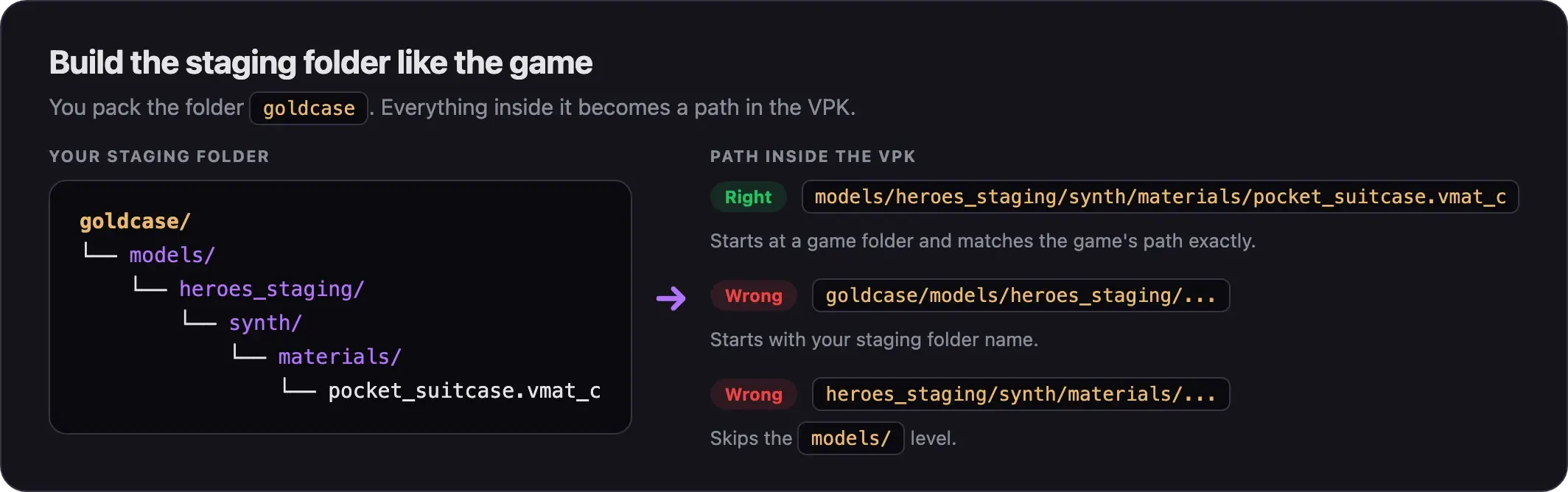
A staging folder holds a copy of your mod's files, laid out like the game. This example packs a recolored briefcase for Pocket.
- Create an empty folder with your mod's name, such as
goldcase. - In the CSDK 12 launcher, right-click your addon and pick Explore Game Folder. Always copy from this game folder, never the content folder.
- Inside
goldcase, create the same folders the game uses:goldcase/models/heroes_staging/synth/materials/. - Copy only the compiled files you changed into the matching folder. The top level of
goldcaseshould hold only game folders, such asmodelsorsounds.
Shortcut: copy your whole addon folder out of game/citadel_addons/, then delete every file you did not change.
Pack it
There are two ways to pack. Pick one.
Start with this method. It works without CSDK 12 open, shows the paths inside the VPK, and most guides use it.
- Open Source 2 Viewer.
- Click File, then Create VPK from folder. A new tab named
new.vpkopens. - Right-click
new.vpkand pick Add Existing Folder. - Select your staging folder, such as
goldcase. Do not open it. Click Select Folder. - If Source 2 Viewer asks to scan dependencies of compiled files, choose Yes. Newer builds may not ask.
- Double-click
new.vpkto see what is inside. Check the paths as shown in Check what is inside. - Right-click
new.vpkand pick Save VPK to disk. - Save it with a name like
pak05_dir.vpk. The naming rules are below.
If a file shows up twice in the list, leave both entries alone. One creator deleted the copy and lost the real file.
Pugzilla shows the same steps in this model swap video from August 2026. They work for any mod, but menus may look a little different now.
Use this if you prefer to stay in CSDK 12. It borrows a Counter-Strike 2 upload window to build the VPK.
- Open the CSDK 12 launcher, select your addon, and click Launch Tools.
- In the Asset Browser's top bar, click CS2 Workshop Manager.
- Click New. Ignore the other buttons.
- Type anything as the name and description. Pick any preview image and any visibility.
- Click Submit. The submit fails. That is expected.
- CSDK 12 still writes a VPK into
game/citadel_addons. Click Contents and check that it holds only the files you changed. - Rename the VPK to
pakNN_dir.vpk.
The CSDK 12 launcher also has a Create VPK option on each addon. We have not tested where it saves the file, so this guide does not use it.
Check what is inside
Check every new VPK before you test it.
- Open the VPK in Source 2 Viewer with File, then Open.
- Look at the top-level folders. They must be game folders, such as
models/,sounds/, orpanorama/. - Make sure no path starts with your staging folder name (
goldcase/models/...) or skips a level (heroes_staging/...withoutmodels/in front). - Make sure every file name ends in
_c. - Compare each path with the same file in the game's
pak01_dir.vpk. They must match exactly.
If a path is wrong, fix your staging folder and pack again.
Name and number it
Name the file pak, two digits, then _dir.vpk, from pak01_dir.vpk to pak99_dir.vpk. Put it straight into game/citadel/addons/. Other names and subfolders do not load.
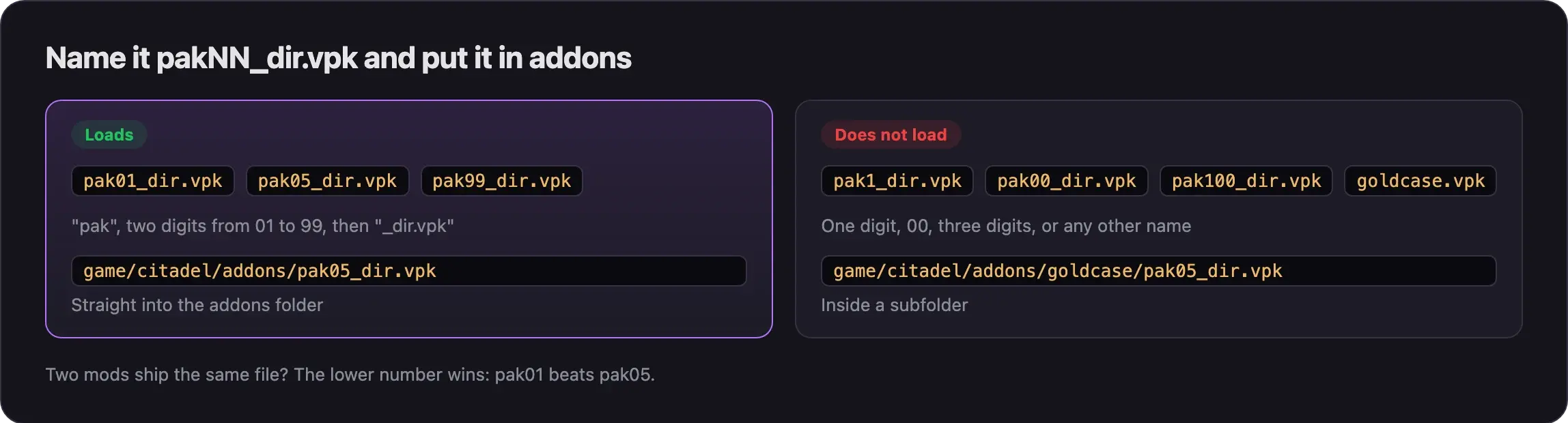
When two mods ship the same file, the lower number wins, so give your mod a lower number to make it win. How Deadlock mods work explains load order.
For test builds, keep one fixed number and overwrite it each time.
Mods bigger than 2 GB
Popular full hero skins are about 125 to 280 MB, so most mods never get close. One VPK from the CS2 Workshop Manager has a 2 GB limit. For bigger mods:
- Use the Multichunk Workshop Manager in CSDK 12. It splits the pack into chunks.
- Or use the command-line version of Source 2 Viewer. Run it in the folder that holds your staging folder:
Source2Viewer-CLI -i "goldcase" --vpk_create "pak05_dir.vpk" --vpk_create_chunk_size 100This writes 100 MB chunks next to the _dir file. Keep every file of the set together, with the same number:
Combine several mods into one VPK
The game loads up to 99 VPKs per folder. Merging mods keeps you under that limit.
- vpkmerge by Slush97 merges several VPKs into one, or splits one apart. It is an unofficial community tool and still new, so keep copies of the originals. Similar tools are in Helper tools and scripts.
- To merge by hand, open each VPK in Source 2 Viewer, select its top folders, and pick Export as is into one shared folder. Then pack that folder. Pugzilla's Combining VPKs/Mods Tutorial shows this.
If two mods hold the same file, only one copy survives, so choose which one you want. A mod manager does not recognize a merged VPK: add it again as a new mod. Merge other people's mods for your own use only. Most Deadlock mods use a license that does not allow sharing changed copies (Credits, licenses, and permissions).
Common problems
More fixes are in Errors when making mods and Mods not loading.
Next steps
Load your VPK and check every part of it before you share it.
Credits
This guide is based on the work of these creators. Check out their original guides.
- Video: Deadlock - Soul Container Model Swaps by Pugzilla.
- Video: Deadlock - Combining VPKs/Mods Tutorial by Pugzilla.
- Guide: How I Make Shiny Metal Materials by ShockHub.
- Guide: Packing an Addon from Deadlock Modding Notes.
- Docs: VPK Management and Command-line utility by the ValveResourceFormat team.
- Guide: Neutral's General Guide for Modding Deadlock by Neutraldrift.