
Errors when making mods
Fix common CSDK 12, Source 2 Viewer, compile, packing, sound, and UI image errors, and find out why a change never shows up in game.
Fixes for errors you hit while making a mod: CSDK 12 problems, failed compiles, packing mistakes, and changes that never show in game. Model and skin errors have their own page: Model and skin problems.
What you need

CSDK 12 is the community Source 2 toolset. Its page covers the binaries and launcher options. Source 2 Viewer opens game files and VPKs, so you can compare paths and sizes. To open your addon's content and game folders, right-click the addon in the CSDK 12 launcher.
CSDK 12 will not start, or your addon is missing
The tools crash
Compile errors
Compile errors show in VConsole, the console window that opens when you launch the tools. Read it after each compile.
Your change does not show in game
This is the most common creator problem. Your edit has to survive five steps, and each one has a usual mistake.
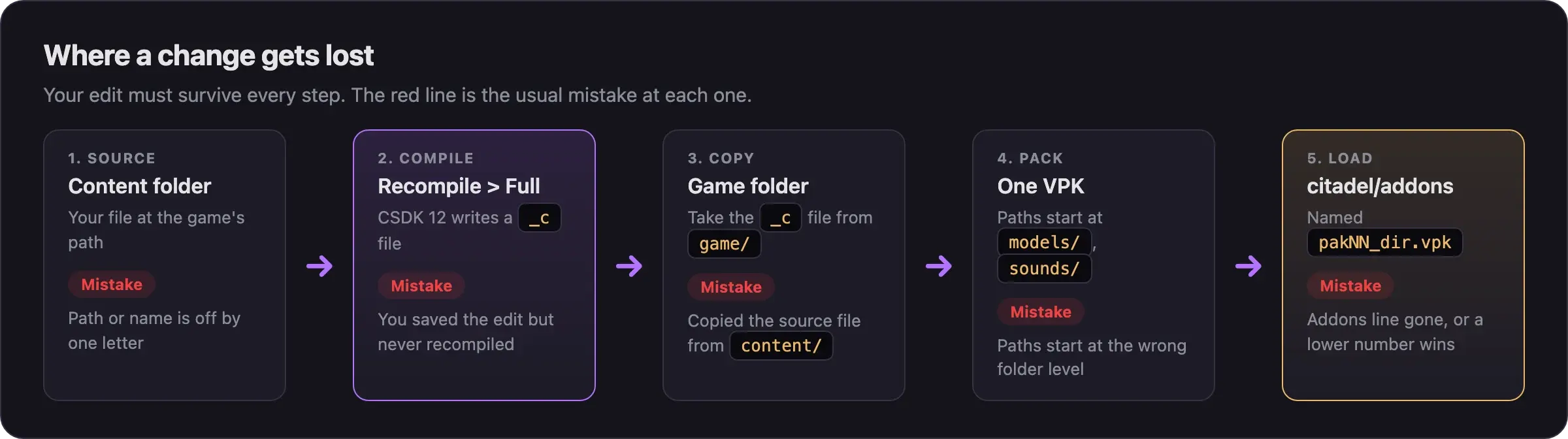
Check these in order:
Recompile
Right-click the file in the Asset Browser and choose Recompile, then Full. Saving the source file is not enough.
Copy from the game folder
Your mod needs the compiled _c file from game/citadel_addons/<addon>/. The content folder holds source files, which the game ignores. A .vmat in a mod does nothing. A .vmat_c works.
Match the path
The path inside your VPK must match the game's path letter for letter. Compare it with pak01_dir.vpk in Source 2 Viewer.
Keep the original name
The game only loads a file with the original name. If you worked under another name, rename the compiled file back.
Ship the textures too
A recompiled material points to new texture files with a hash in the name, such as abrams_coat_color_png_63291cfb.vtex_c. Pack the new .vtex_c files next to the .vmat_c.
Check the VPK
Name it pakNN_dir.vpk and put it straight into game/citadel/addons/. A mod with a lower number that changes the same file wins. Mods not loading covers the rest of the player-side checks.
Packing problems
Material and texture problems
Sound problems
UI image problems
Particle problems
Next steps
Check your packing steps, from staging folder to a finished pakNN_dir.vpk.
Credits
This guide is based on the work of these creators. Check out their original guides.
- Guide: CSDK 12, Compiling UI Textures, and Replacing Sounds from Deadlock Modding Notes.
- Guide: How I Make Shiny Metal Materials by ShockHub.
- Guide: Neutral's General Guide for Modding Deadlock by Neutraldrift.
- Guide: How to Image Replacement for Dummies by Axelliax.
- Guide: Simple Particle Recolor Tutorial by TheLastFriendly.
- Video: How to Make Custom Sound Mods in Deadlock | Random Audio & Sound Switches by Adamtheboss9.
- Video: (New Tool) Deadlock - Particle Color Change Tutorial by Pugzilla.
- Q&A: Need help with Melee hitsounds issue on GameBanana, answered by lunanemic.