
Linux and Steam Deck
Where Deadlock's files live on Linux and Steam Deck, folder name rules, and fixes for mod manager windows that stay grey.
Deadlock has no Linux version. It runs through Proton, Steam's compatibility layer, so mods go in the same game folders as on Windows. This page shows where those folders are, which name rules matter, and how to fix mod manager problems. The install steps themselves are in Install mods by hand.
We have not tested these steps on a Linux PC or a Steam Deck with the current game build yet. The paths come from Deadlock Mod Manager's source code, and the fixes come from its docs.
What you need
Desktop Mode
on a Steam DeckA plain text editor
for hand installs
A mod manager
optionalOn a Steam Deck, switch to Desktop Mode first. If you use a mod manager, pick one with a Linux build, such as Deadlock Mod Manager (DMM).
Find the game folder
This way works on every system.
- Open your Steam Library.
- Right-click Deadlock.
- Choose Manage, then Browse local files.
- Open
game, thencitadel. Youraddonsfolder goes here.
These are the default Deadlock folders. ~ means your home folder.
| Steam install | Deadlock folder |
|---|---|
| Native Steam | ~/.local/share/Steam/steamapps/common/Deadlock/ |
| Flatpak Steam | ~/.var/app/com.valvesoftware.Steam/.local/share/Steam/steamapps/common/Deadlock/ |
| Snap Steam | ~/snap/steam/common/.local/share/Steam/steamapps/common/Deadlock/ |
- Native Steam also reaches the same folder through
~/.steam/steamand~/.steam/root. - Flatpak Steam can use
.../data/Steam/...instead of.../.local/share/Steam/.... - Is Deadlock on a microSD card or another drive? Open Steam's Settings, then Storage to see every library.
Proton changes where saves and settings live. It does not move the game files.
Use lowercase names
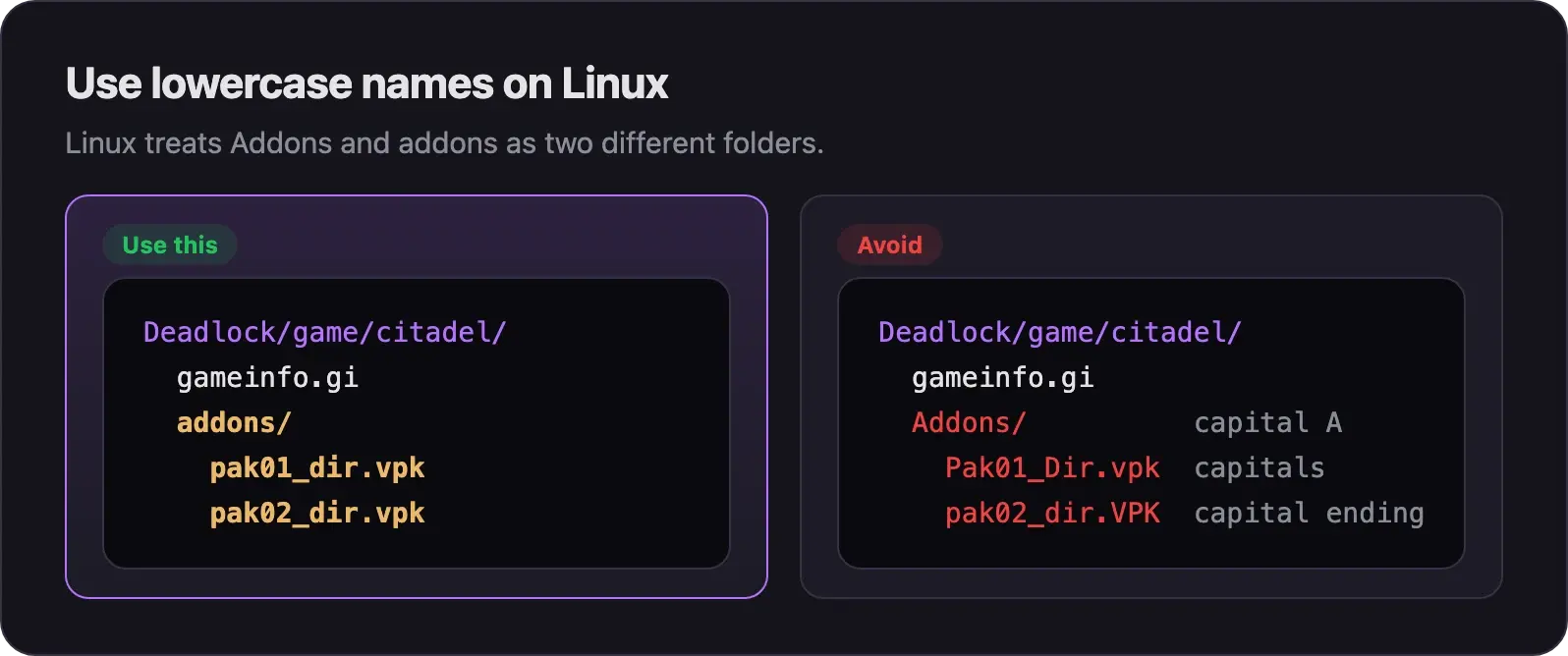
Linux file names are case-sensitive. Addons and addons are two different folders there. Mod managers write to addons in lowercase, so match them.
- Name the folder
addons, all in lowercase. - Name every mod
pak01_dir.vpktopak99_dir.vpk, all in lowercase. - Check the ending too. It must be
.vpk, not.VPK.
We have not tested whether the game itself, running under Proton, cares about capitals. Lowercase works either way.
Mod managers on Linux
Both big mod managers have Linux builds. Use only one of them. On SteamOS, players use either the DMM Flatpak or the Grimoire Flatpak. Both work for them.
Builds: Flatpak, AppImage, .deb, .rpm, an APT repository, the AUR, nixpkgs, and a Gentoo overlay.
The DMM team calls its Linux support "best-effort". Follow its installation guide.
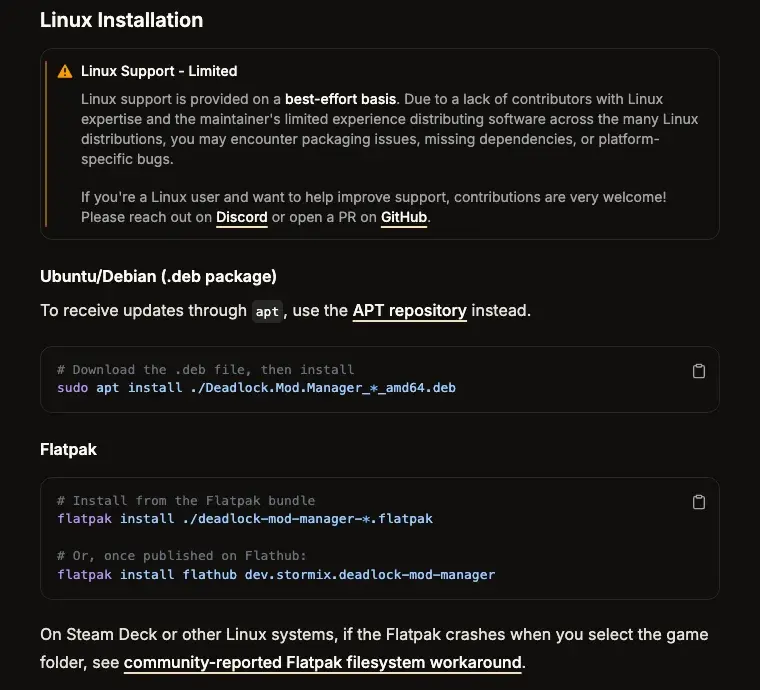
If DMM feels slow on Linux, install its CEF build. It bundles its own browser engine, which runs faster for most people.
Builds: AppImage, .deb, Flatpak, the AUR, an APT repository, and a Nix flake.
Get it from grimoiremods.com or its GitHub page.
Play from Game Mode on a Steam Deck
- Set up your mods in DMM in Desktop Mode.
- Click Launch Modded once. This edits
gameinfo.giso Deadlock loads your mods. - Return to Game Mode and start Deadlock as usual.
Deadlock should keep loading your mods, because the edit stays in gameinfo.gi. After a game update, repeat step 2. We have not tested this on a Deck yet.
DMM fixes on Linux
Creator tools are Windows only
You can install and play mods on Linux. Making most mods is a different story.
| Tool | On Linux |
|---|---|
| CSDK 12 | Windows only. It compiles sounds, materials, and models. We know of no tested way to run it on Linux. |
| Source 2 Viewer | The window app is Windows only. Its command-line version runs on Linux. It can open game files and pack a folder into a VPK. |
| Browser tools, such as Deadlock Forge and DeadMod | They run in a web browser, so they should work on Linux. See Make mods without installing tools. |
For anything that needs a compile step, use a Windows PC.
Still stuck
The DMM team's Troubleshooting Guide has more Linux fixes.
DMM problems on every system.
The checks to run when nothing shows in game.
Credits
This guide is based on the work of these creators. Check out their original guides.
- Guide: Troubleshooting Guide and Installation Guide from the Deadlock Mod Manager docs.
- Tool: Deadlock Mod Manager source code by Stormix and contributors. The Linux game paths on this page come from it.
- Tool: Grimoire by Slush97.
- Discussion: Deadlock mods on SteamOS? by LaserBungalow and Question for Linux users by agn93 on r/DeadlockTheGame.