
Install mods by hand
Edit gameinfo.gi, create the addons folder, and name your VPK files so Deadlock loads mods without a manager. Also how to turn mods off.
To install Deadlock mods without a mod manager, you edit one game file, create one folder, and rename your mods. Read What's allowed and how to stay safe first.
When to install by hand
Deadlock Mod Manager does every step on this page for you, so most players should use it. Install by hand to see exactly what changes, to test your own VPK, when a mod's readme says so, or when a manager does not work on your PC.
Pick one method. If you use a mod manager, let it handle gameinfo.gi and the addons folder. Never run two managers, such as Deadlock Mod Manager and Grimoire, on one install.
What you need
Deadlock on Steam
latest versionA plain text editor
Notepad, Notepad++, or VS CodeAn archive tool
such as 7-ZipA mod you downloaded
.vpk or archiveYou need the archive tool only if Windows cannot open your mod download. Divine is adding Deadlock mods. When they arrive, you'll find them in Explore mods, and you'll publish yours from the Creator Panel.
How it works
The file gameinfo.gi lists the folders the game reads. You add an addons folder to that list, above the game's own files, so your mod files win.
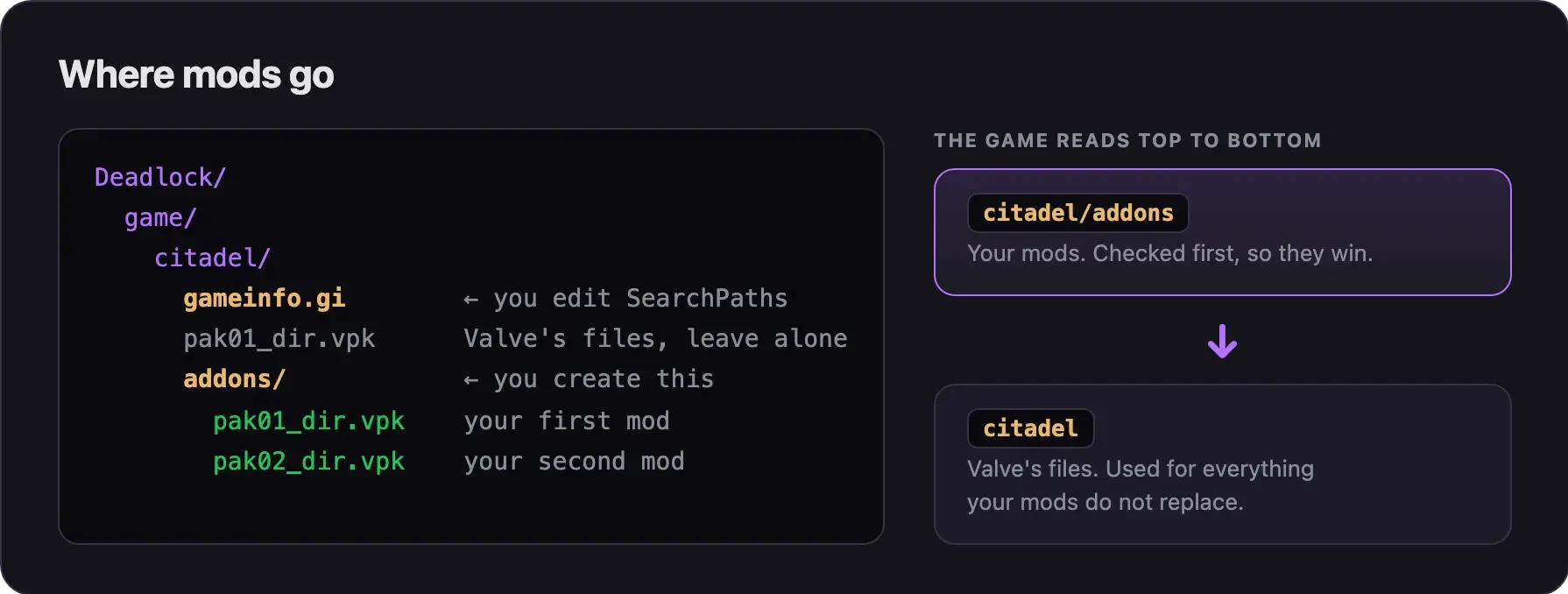
Install a mod by hand
Find your Deadlock folder
- Open your Steam Library.
- Right-click Deadlock.
- Choose Manage, then Browse local files. A window opens in the
Deadlockfolder. - Open the
gamefolder, then thecitadelfolder.
Newer Steam versions also have Properties, then Installed Files, then Browse.
The default Windows path is C:\Program Files (x86)\Steam\steamapps\common\Deadlock\. In another Steam library, look in <Library>\steamapps\common\Deadlock\.
Edit gameinfo.gi
Change nothing else in this file. Edits to other sections can block
matchmaking for your whole party. Never paste a "performance" gameinfo.gi
from the internet.
Before the edit, Valve's block looks like this. The real file also has a few comment lines that start with //.
		SearchPaths
		{
			Game_UILanguage		citadel_*LANGUAGE*
			Game_LowViolence	citadel_lv
			Game				citadel
			Game				core
}- Close Deadlock.
- Copy
gameinfo.gito your desktop as a backup. Use it only to undo a mistake today. - Open
gameinfo.giin your text editor. - Find the line that says
SearchPaths. It sits inside theFileSystemblock. - Select everything from
SearchPathsdown to its closing}. - Paste this block in its place:
		SearchPaths
		{
			Game_UILanguage		citadel_*LANGUAGE*
			Game_LowViolence	citadel_lv
			Game				citadel/addons
			Mod					citadel
			Write				citadel
			Game				citadel
			Mod					core
			Write				core
			Game				core
}- Leave the two
UserSettingsPathIDlines below the block as they are. - Save the file.
If Windows will not save the file, right-click gameinfo.gi and choose Properties. Untick Read-only, click OK, and save again.
A typo stops the game from starting with Failed to parse KeyValues. Check that every { has a matching }.
Create the addons folder
- Open the
game/citadelfolder. - Create a new folder.
- Name it
addons, all in lowercase.
Put mods straight into this folder. The game ignores subfolders.
Add a mod
- Find the mod's file you downloaded. It is a
.vpkfile, or a.zip,.rar, or.7zarchive. - Open the archive and find the
.vpkfile inside. Skip this step if you have a.vpkfile already. - Check that the archive holds no
.exe,.dll,.bat,.ps1, or.scrfiles. A real mod never needs them. - Extract the
.vpkfile from the archive. - Rename it to a free number:
pak01_dir.vpk,pak02_dir.vpk, and so on, up topak99_dir.vpk. - Move it into
game/citadel/addons/. - Read the mod's readme. Some mods need extra steps.
- Start Deadlock and check the mod in the hideout or a bot match.
File names that work
| File name | Does it load? |
|---|---|
pak01_dir.vpk to pak99_dir.vpk | Yes |
pak1_dir.vpk (one digit) | No |
pak00_dir.vpk or pak100_dir.vpk | No |
cool_skin.vpk (any other name) | No |
addons/my_mod/pak01_dir.vpk (in a subfolder) | No |
Mods with more than one file
Big mods can come as a set, such as pak01_dir.vpk with pak01_000.vpk and pak01_001.vpk. Give every file in the set the same new number. For example, rename pak03_dir.vpk and pak03_000.vpk to pak05_dir.vpk and pak05_000.vpk:
Choose the load order
When two mods change the same file, the lower number wins: pak01_dir.vpk beats pak05_dir.vpk. Give the mod you care about most the lowest number, and swap numbers if the wrong mod shows in game.
Mods that change different files all work, in any order. Skins and sounds for the same hero often clash. You can load up to 99 mods this way.
After a game update
Steam replaces gameinfo.gi whenever an update ships a new copy, about once a month, and whenever you run Verify integrity of game files. Your mods then stop loading with no error. The addons folder stays on disk.
- Close Deadlock.
- Open
game/citadel/gameinfo.gi. Ifcitadel/addonsis missing, Steam replaced the file. - Redo Edit gameinfo.gi on the new file.
The new file may hold other changes from Valve. Always redo the edit on the fresh copy.
Big updates also break some mods, most of all HUD mods. A crash like FATAL ERROR: Unable to find child '...' in layout file '...' means an outdated HUD mod. To find the broken mod:
- Move all your VPK files out of
addonsand start the game once. - Add the mods back one at a time, and start the game after each one.
- Leave out the mod that crashes the game, and wait for a newer version of it.
Mods not loading and Crashes, launch errors, and matchmaking blocks have more fixes.
Turn all mods off
To play the normal game but keep your mod files:
- Right-click Deadlock in your Steam library.
- Choose Properties, then Installed Files, then Verify integrity of game files.
Steam restores Valve's gameinfo.gi, so the game stops reading addons. Redo the edit to turn mods back on. Renaming addons to addons_off should also work, but we have not tested it on the current build.
Remove mods completely
- Close Deadlock.
- Delete everything inside
game/citadel/addons/. - Delete any extra folders a mod manager made in
game/citadel/. Look foraddonsplus a number, such asaddons2, and agrimoirefolder. - Run Verify integrity of game files in Steam. This restores Valve's
gameinfo.gi. - Delete the empty
addonsfolder if you want.
Uninstalling Deadlock does not delete files you added. Old mods can survive a reinstall and keep crashing the game.
Common problems
Next steps
Search paths and load order, explained.
Testing your own VPK? Start here.
Start making your own mods.
Credits
This guide is based on the work of these creators. Check out their original guides.
- Guide: Installing Mods from Deadlock Modding Notes.
- Guide: How to install Mods by Deer_uwu on GameBanana.
- Guide: Troubleshooting from the Deadlock Mod Manager docs.
- Tool: Deadlock Mod Manager source code by Stormix and contributors. The
gameinfo.giblock on this page matches what it writes. - Tool: Grimoire source code by Slush97. Its notes explain why each line is needed.
- Game data: GameTracking-Deadlock by SteamTracking (SteamDB), which tracks every change to Valve's
gameinfo.gi.