
What's allowed and how to stay safe
What Deadlock mods can change, which mods cross into an unfair advantage, and how to download mods and tools without risking malware.
Read this before you install or make your first mod. It shows which mods cross the line and how to avoid malware.
What you need
An archive tool
such as 7-ZipNothing to install. The archive tool lets you look inside mod downloads.
How mods work in a match
Mods are client-side. You see a skin on every player who uses that hero, enemies included. Other players see the normal game.
So a skin can give you an advantage by accident: a bright skin makes an enemy easier to spot.
What Valve has said
Valve has published no mod policy for Deadlock, so nobody can promise what is allowed. Its update notes never mention player mods, and Valve lists mod support as "Unsupported" in the invite-only playtest. The choice to use mods is yours.
Valve has changed the game, though:
- Since March 2026, matchmaking refuses to start if anyone in your party runs the creator tools or has changed certain parts of
gameinfo.gi. - Since September 2026, the game ignores many visibility settings in
gameinfo.gi, such as enemy outlines and glow.
The Steam Subscriber Agreement lets Valve close accounts that use mods for an unfair advantage. Reports from 2024 say a ban for unfair play also banned every player that account invited to the playtest.
Mods you can make
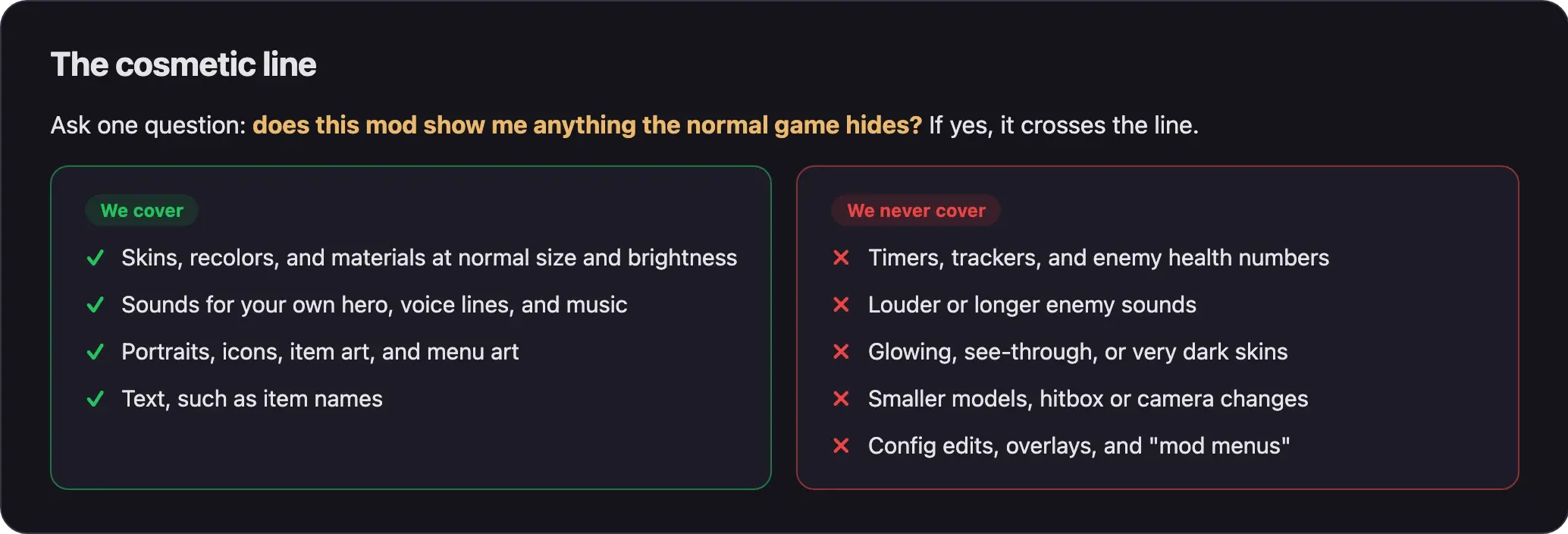
This wiki covers mods that change how your game looks and sounds, plus packing, installing, and publishing them.
Before you share a mod, ask: does it show me anything the normal game hides? If yes, it crosses the line. Check your skin from the enemy's side too. A skin that glows or turns very dark is easier to spot.
Mods we never cover
These mods give you an advantage over players without them. This wiki will never explain, link, or show them.
| Type | Examples |
|---|---|
| Timers and trackers | Camp or buff respawn timers, cooldown or soul trackers, enemy health numbers, ranks, missing-enemy alerts, announcer packs that call objectives |
| Louder enemy cues | Louder or longer heavy melee, parry, ultimate, or footstep sounds |
| Visibility changes | Glowing, bright, see-through, or very dark skins; skins you can see through veils or fog; removed outlines, particles, or smoke; brighter lighting; fog turned off; a wider view; scope removal |
| Size and game data | Smaller, thinner, or taller hero models; hitbox changes; camera changes; gameplay data changes |
| Config and code tricks | Console variable edits in gameinfo.gi, code injection, overlays, "mod menus" |
Size matters in Deadlock. A smaller or thinner hero blocks less of your screen, and a taller one can see over cover. Keep every skin the same size as the original.
They can cost you your account, and a ban can also reach the friends you invited. Check every mod against this table before you install or share it.
Keep your account in good standing
- Edit only the
SearchPathsblock ofgameinfo.gi. It is the only part a mod needs. Changes to other sections can block matchmaking for your whole party. - Never paste a "performance" or config
gameinfo.gifile from the internet. These files change the blocked sections. - Close CSDK 12 and every other creator tool before you queue.
- Remove custom map mods before a normal match. Custom maps and gameplay data mods do not work in Valve's matches.
If the game blocks you, you see this message:
Unable to enter matchmaking while any party member is running Tools-mode, or has unsupported changes to the following sections of their 'gameinfo.gi': Engine2, MaterialSystem2, NetworkSystem, Particles, RenderSystem, SceneSystem, WorldRendererTo fix it, close all creator tools. Run Verify integrity of game files in Steam, then redo only the SearchPaths edit, by hand or with your mod manager.
For other crashes and launch errors, see Crashes, launch errors, and matchmaking blocks.
Download safely
Know what a real mod looks like
- A Deadlock mod is a
.vpkfile, usually inside a.zip,.rar, or.7zarchive, often with a readme. - A mod never needs an
.exe,.dll,.bat,.ps1, or.scrfile. If an archive has one, do not open it. Delete the download.
Where to get tools and mods
Deadlock Mod Manager
Official site: deadlockmods.app. Official code: the
deadlock-mod-manager/deadlock-mod-manager repo on GitHub.

Official site: s2v.app.
The CSDK 12 page on Deadlock Modding Notes.
Some creator tools, like CSDK 12, are shared as Google Drive files with no way to check them. Only use the link on the tool's community page.
Divine is adding Deadlock mods. When they arrive, you'll find them in Explore mods, and you'll publish yours from the Creator Panel. Until then, check every mod you download against the list above.
Watch out for fakes
deadlockmodmanager.comis an unofficial lookalike, not the Deadlock Mod Manager site.- GitHub repos named
deadlock-mod-manager-modsare fakes. They copy the real name but hold no real code. - Repos that promise a "mod menu", "ESP", or a "Deadlock 2026" toolkit are bait: tools for unfair play, or malware. Never download them.
steamdb.comis not SteamDB. The real SteamDB issteamdb.info.
Respect other creators
- Most Deadlock mods use the CC BY-NC-ND 4.0 license: give credit, never sell, and never share changed versions. Ask the author before you edit, reupload, or reuse their work.
- Credit everyone whose work you use.
- Never sell your mods. Valve allows only non-commercial use of content made with its tools.
Credits, licenses, and permissions explains the details.
Next steps
Recommended. Adds your mods and redoes the setup after game updates.
Edit gameinfo.gi yourself and see exactly what changes.
Install Source 2 Viewer and CSDK 12 to make your own mods.
Credits
This page is based on the work of these creators. Check out their original pages.
- Rules: Deadlock section rules (rule R-DL.824 and others) by the GameBanana Deadlock section managers.
- Game data: GameTracking-Deadlock by SteamTracking (SteamDB). Valve's matchmaking message and settings list come from here.
- Legal: Steam Subscriber Agreement by Valve.
- Policy: Paywalled Content Policy by GameBanana.
- Discussion: What started this recent anti-mod wave? by sneakycrown on r/DeadlockTheGame.