
How Deadlock mods work
How Deadlock reads VPK files, why a mod replaces game files by path, what compiled _c files are, and how load order picks a winner.
A Deadlock mod swaps some of the game's files for yours. This page explains how the game finds those files and which copy wins. Read it before your first mod: it explains most "my mod does nothing" problems.
What you need
Nothing to install. This page explains ideas, not steps. If you like, look inside the game files while you read:

Everything ships in VPK files
Deadlock runs on Valve's Source 2 engine. Its internal name is citadel, so you see that name in many folders.
The game packs its files into VPK archives:
game/citadel/pak01_dir.vpkis the main index. It lists about 150,000 files.- The data sits in numbered chunks next to it, from
pak01_000.vpkto aboutpak01_326.vpk. Open only the_dirfile. Tools read the chunks through it. game/core/pak01_dir.vpkholds shared engine files.- Each map is its own VPK in
game/citadel/maps/.
The main folders inside pak01_dir.vpk:
| Folder | What it holds |
|---|---|
models/ | Models, their materials and textures, animation clips, and skeletons. Heroes are in models/heroes_wip/ and models/heroes_staging/. |
materials/ | Shared materials and textures. |
sounds/ | Audio files. Most of them are voice lines. |
soundevents/ | Scripts that pick which sound plays for each game event. |
particles/ | Effects. Hero abilities are in particles/abilities/. |
panorama/ | The interface: images, layouts, and styles. |
animgraphs/ | Animation graphs that drive hero animations. |
scripts/ | Game data, such as hero and ability stats. Never put these in a mod. |
Compiled files end in _c
Every file inside the VPK is compiled into a binary format the game reads fast. Compiled names end in _c, like inferno.vmdl_c.
You never edit a _c file. Instead:
- Decompile the game file with Source 2 Viewer. You get a source file you can edit.
- Edit the source file in an image, audio, or text editor.
- Compile it with CSDK 12. It writes a new
_cfile.
| You edit | The game reads | What it is |
|---|---|---|
.vmdl | .vmdl_c | Model |
.vmat | .vmat_c | Material: which textures a surface uses, and how |
.png, .tga, .psd | .vtex_c | Texture |
.wav, .mp3 | .vsnd_c | Sound |
.vsndevts | .vsndevts_c | Sound event script |
.vpcf | .vpcf_c | Particle effect |
.xml, .css, .js | .vxml_c, .vcss_c, .vjs_c | Interface files |
Every other file type is in Deadlock file types.
A mod replaces files by path
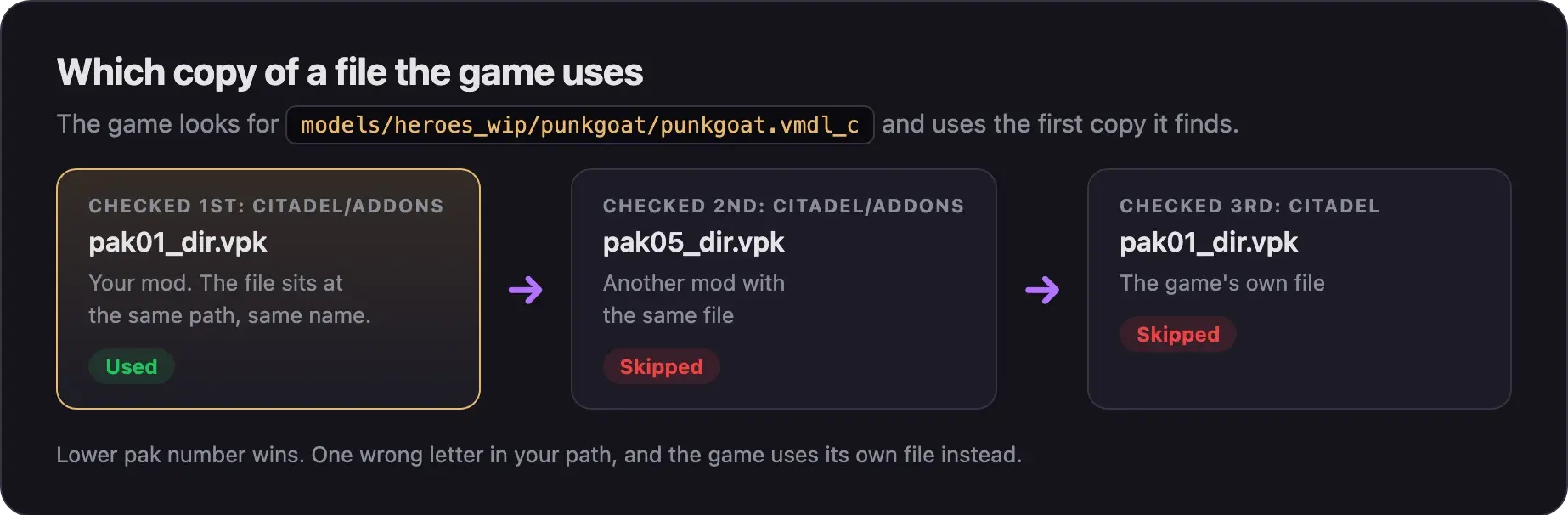
The game looks up every file by its path. Billy's model, for example, is models/heroes_wip/punkgoat/punkgoat.vmdl_c.
If your mod holds a file at exactly that path and name, the game uses yours instead. One wrong letter or folder, and the game quietly uses its own file. That is the most common reason a mod does nothing.
- Folder names use Valve's codenames, not hero names. Billy is
punkgoat. Look up every hero in Hero names and file paths. - A mod holds compiled
_cfiles only. A loose.pngor.wavin a mod does nothing.
Mods change files on your PC only. You see a skin on every player using that hero, enemies included. Other players see the normal game. That is why a skin can give an unfair advantage by accident. What's allowed and how to stay safe explains where the line is.
How the game finds your mods
The file game/citadel/gameinfo.gi tells the game where to look. Its SearchPaths part lists folders, and the game checks them from top to bottom. It uses the first copy of a file it finds.
Valve's own gameinfo.gi does not list the addons folder, so by default the game ignores mods. A mod manager, or you by hand, adds the line Game citadel/addons above Game citadel. Then the order is:
citadel/addons: your mods. The game loads everypak01_dir.vpktopak99_dir.vpkhere and ignores other names.citadel: the game's own files.core: shared engine files.
Every game update and every Steam "Verify integrity of game files" puts back Valve's gameinfo.gi. Your mods stay in the folder but stop loading until the line is back. A mod manager adds it again for you. The exact edit is in Install mods by hand. Change only the SearchPaths part: edits to other parts of gameinfo.gi can block matchmaking.
Load order
- Mods that change different files all work.
- Two mods that ship the same file: the lower number wins.
pak01_dir.vpkbeatspak05_dir.vpk. - Two mods that each change part of the same shared file can break each other. Order does not fix that. Pick one.
- The game loads up to 99 mod files per folder. Mod managers add more folders to get around this.
Mod does nothing? Look for a lower-numbered mod that changes the same file.
What a mod must never contain
Gameplay data and skeletons break after updates and can break other players' mods too.
- Gameplay data (
scripts/*.vdata_c). Hero and ability stats. One popular skin shipped them and kept a new hero locked after an update. Changing them is also not cosmetic. - Skeletons (
.vnmskel_c). Yours replaces the hero's real one. When Valve changes the rig, animations break for every mod of that hero. - Programs. A mod is a
.vpk, often inside a.zip,.rar, or.7z. It never needs an.exe,.dll,.bat,.ps1, or.scrfile. - Anything that gives an advantage. Keep every mod cosmetic.
Why updates break mods
Big updates break many mods at once. The "City Never Sleeps" update on 2026-09-29 broke most HUD mods. Common reasons:
- Models move. Abrams moved from
heroes_staging/atlas_detective_v2/toheroes_wip/abrams/. A mod at the old path stops working with no error. - Animations, skeletons, and cameras change. Valve keeps moving heroes to a newer animation system, so replacement models must point to the new files. Old skins can end up with the camera stuck in the middle of the screen.
- Interface layouts change. Outdated HUD mods can crash the game at launch.
gameinfo.gigets replaced. Mods stop loading until the addons line is back.
To fix a mod, move its files to the new paths, then recompile and repack. Update your mod walks through it.
Next steps
Turn your compiled files into a mod, with the full list of what goes in and what stays out.
Credits
This guide is based on the work of these creators. Check out their original guides.
- Data: GameTracking-Deadlock by SteamTracking: Valve's file lists, hero data, and
gameinfo.gihistory for every build. - Guide: Content mounting by the Source2Wiki contributors.
- Guide: Installing Mods and Asset Structure from Deadlock Modding Notes.
- Docs: Domain model by the Deadlock Mod Manager team.
- Guide: From Start to Finish (Fuji's Asset Replacement Guide) by Fuji (FellOffFuji).