
Replace voice lines
Find a hero's voice lines through the game's talker files, replace one line or a whole voice with your own recordings, and keep subtitles in mind.
Replace one voice line, or a hero's whole voice, with your own recordings. The compile and pack steps are the same as for any sound. This page shows how to find the right line, build a full voice pack, and handle subtitles. Make your first sound mod with Replace a sound before you start.
What you need

Source 2 Viewer
CSDK 12
Audacity
or any audio editorYour recordingsThe hero's codenameOne finished sound modSource 2 Viewer plays and exports voice lines, and opens the talker and soundevents files. CSDK 12 compiles your recordings. Your first sound mod teaches you the Billy Audio Template steps.
Use your own voice, or a voice actor who agreed. Community rules for Deadlock mods do not accept AI-generated content.
How the game picks a voice line
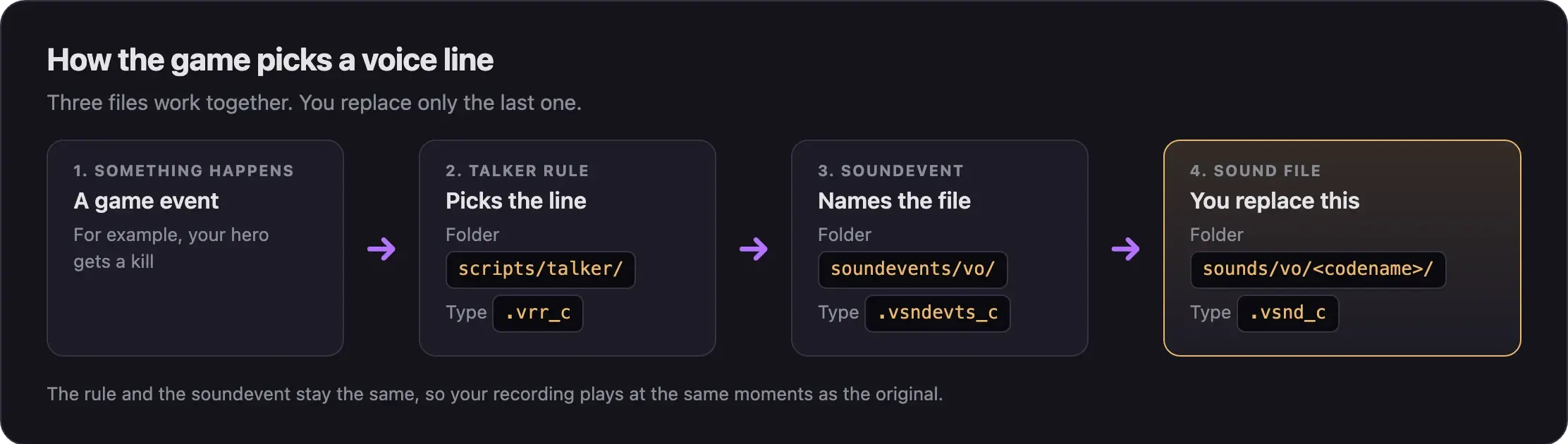
Voice lines go through one more step than other sounds. A talker rule (a .vrr file) decides which line fits the moment. The rule fires a soundevent, and the soundevent names the sound file.
You only replace the sound file. The rule and the soundevent stay the same, so your line plays at the same moments as the original.
Where voice files live
Voice lines are most of the game's sounds: about 77,800 of 89,800 files. They all sit under sounds/vo/ in game/citadel/pak01_dir.vpk.
| Folder | Who speaks |
|---|---|
sounds/vo/<codename>/ | One hero. Each has about 1,500 to 2,000 lines. |
sounds/vo/announcer/female_patron/ | The Patron announcer, female voice. |
sounds/vo/announcer/male_patron/ | The Patron announcer, male voice. |
sounds/vo/shopkeeper/ | The shopkeeper. |
sounds/vo/spirit_jar/, sounds/vo/newscaster/ | Other speaking characters. |
Hero folders use codenames, not hero names. Look the codename up in Hero names and file paths, then check the folder name in Source 2 Viewer.
The other two files for a hero's voice:
| File | What it holds |
|---|---|
soundevents/vo/generated_vo_hero_<codename>.vsndevts_c | The voice line soundevents |
scripts/talker/generated_response_rules_hero_<codename>.vrr_c | The talker rules |
Keep it fair
Mods only change your own game. But you hear your voice lines whenever anyone plays that hero, enemies included.
Keep each line about as loud and as long as the original. Never make an enemy's ultimate or warning lines easier to hear. Never make announcer packs that call out objective spawns or timers. Read What's allowed and how to stay safe.
Find a line
Pick the way that fits what you know.
- Open Source 2 Viewer.
- Open
Deadlock/game/citadel/pak01_dir.vpk. - Go to
sounds/vo/<codename>/. - Double-click a file to play it.
- Write down the full path and file name when you find your line.
- Start a private match.
- Open the console and type
snd_showstart 1. - Play until the hero says the line.
- Read the path the console prints for that line.
Use this when you know the moment, but not the file.
- In Source 2 Viewer, open
scripts/talker/generated_response_rules_hero_<codename>.vrr_c. - Find the rule for the moment you want. Note the soundevent name it plays.
- Open
soundevents/vo/generated_vo_hero_<codename>.vsndevts_c. - Search for that soundevent name.
- Read its
vsnd_filesentry. That is the path of the sound file.
If the entry lists several files, the game picks one of them each time. Replace all of them to change that moment every time.
Replace one line
These are the same steps as in Replace a sound, in short. Go back there for the details of each step.
Set up the addon
- In the CSDK 12 launcher, duplicate Billy Audio Template. Name the copy in lowercase with no spaces, such as
myvoice. - Delete the Billy sound files in the copy.
Add your recording
- In the addon's content folder, rebuild the line's folder path, such as
sounds/vo/<codename>/. - Open the original line next to your recording in Audacity. Trim yours to about the same length and loudness.
- Export it as
.wavor.mp3. Give it the original name in lowercase. Only the ending changes.
Compile
Launch the tools. In the Asset Browser, right-click your file and choose Recompile, then Full.
Pack and test
- Copy the compiled
.vsnd_cfrom the addon's game folder into a staging folder, at the same path. - Pack it with Pack your mod into a VPK.
- Check it with Test your mod in game.
You do not need the template's soundevents folder. Leave it out of your VPK.
Make a full voice pack
A full pack is the same steps, many times over. You do not need every line. Lines you skip keep the original voice.
- In Source 2 Viewer, right-click the hero's
sounds/vo/<codename>/folder and choose Decompile & export. - Save it to a work folder outside your addon. Use it to listen to each line and copy its name.
- Record your lines. Start with the ones you hear most often.
- Name each file exactly like the line it replaces, in lowercase.
- Put all your files in the addon at
sounds/vo/<codename>/. - In the Asset Browser, select all your new files at once. Right-click and choose Recompile, then Full.
- Copy every compiled
.vsnd_cinto your staging folder, then pack and test.
Big .wav packs make huge VPKs. An encoding.txt file can compress them to mp3 when you compile. Loop and compress sounds shows how. If your VPK still goes over 2 GB, the packing guide covers mods that big.
Subtitles
Subtitles come from text files, not from the sound. If your new line says different words, the subtitle still shows the old text.
Voice line text is in two places:
game/citadel/resource/closecaption_english.txtgame/citadel/resource/localization/citadel_generated_vo/
Search both for the old words of your line. Edit the text where you find it. Change item names and other text shows how to edit and ship text files.
Announcer lines
The Patron announcer has a female and a male voice. Its files sit in sounds/vo/announcer/female_patron/ and sounds/vo/announcer/male_patron/. File names say what each line is about, like patron_female_ally_<hero>_killing_streak_01.vsnd_c.
You replace them like any other line. Keep the same lines at the same moments.
No guide covers Patron swaps yet, so test yours well. The game also has language folders, such as citadel_french. If you play in another language, your result may differ.
Common problems
Next steps
Make one moment pick a different sound each time, by editing the hero's soundevents file.
Credits
This guide is based on the work of these creators. Check out their original guides.
- Guide: Replacing Sounds from Deadlock Modding Notes.
- Video: (Read Desc) Deadlock - Sound Replacement Tutorial by Pugzilla.
- Data: GameTracking-Deadlock by SteamTracking, for the voice, talker, and subtitle file paths.
- Tool: Source 2 Viewer by the ValveResourceFormat team.