
Bật Tắt bằng CTRL+5
Thêm chức năng bật tắt submesh bằng CTRL+5 vào mod League of Legends với Jade và animation graph.
Thêm chức năng bật tắt bằng CTRL+5 vào mod chỉ bằng Jade.
Hướng dẫn này sẽ chỉ bạn cách thêm chức năng bật tắt bằng CTRL+5 giống trong video sau:
Đầu tiên, thêm initialSubmeshToHide vào skinMeshProperties. Thay
YourSubmesh bằng submesh bạn muốn ẩn mặc định.
initialSubmeshToHide: string = "YourSubmesh"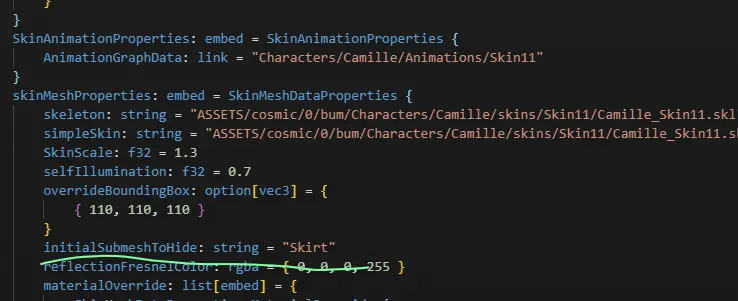
Trong AnimationGraphData, thêm các mục sau vào mClipDataMap. Hai dòng
mCascadeBlendValue và mClipDataMap cho biết các mục cần nằm ở đâu. Đừng tạo
mClipDataMap thứ hai nếu trường này đã có sẵn.
      mCascadeBlendValue: f32 = 0
            mClipDataMap: map[hash,pointer] = {
                "Toggle" = ConditionBoolClipData {
                    Updater: pointer = LogicDriverBoolParametricUpdater {
                        driver: pointer = SubmeshVisibilityBoolDriver {
                            Submeshes: list[hash] = {
                                "Skirt"
                            }
                            VISIBLE: bool = false
                        }
                    }
                    mTrueConditionClipName: hash = 0xbe8683f0
                    mFalseConditionClipName: hash = 0x8aa48b13
                }
                0xbe8683f0 = ParallelClipData {
                    mFlags: u32 = 14
                    mClipNameList: list[hash] = {
                        0x43191761
                    }
                }
                0x43191761 = AtomicClipData {
                    mFlags: u32 = 14
                    mTrackDataName: hash = "Toggle"
                    mMaskDataName: hash = "Default"
                    mEventDataMap: map[hash,pointer] = {
                        "Fade" = ParticleEventData {
                            mEffectKey: hash = 0xcef6c126
                            mParticleEventDataPairList: list[embed] = {
                                ParticleEventDataPair {
                                    mBoneName: hash = "C_Buffbone_GLB_Layout_Loc"
                                }
                            }
                            mIsLoop: bool = false
                            mIsKillEvent: bool = false
                        }
                        0x38503e10 = SubmeshVisibilityEventData {
                            mShowSubmeshList: list[hash] = {
                                "Skirt"
                            }
                            mHideSubmeshList: list[hash] = {
                                0x8ba930d1
                            }
                        }
                    }
                    mAnimationResourceData: embed = AnimationResourceData {
                        mAnimationFilePath: string = "ASSETS/cosmic/0/bum/Characters/camille/Skins/Base/Animations/camille_Taunt.anm"
                    }
                }
                0x8aa48b13 = ParallelClipData {
                    mFlags: u32 = 14
                    mClipNameList: list[hash] = {
                        0x04acc354
                    }
                }
                0x04acc354 = AtomicClipData {
                    mFlags: u32 = 14
                    mTrackDataName: hash = "Toggle"
                    mMaskDataName: hash = "Default"
                    mEventDataMap: map[hash,pointer] = {
                        "FadeOut" = ParticleEventData {
                            mEffectKey: hash = 0xe271f27c
                            mParticleEventDataPairList: list[embed] = {
                                ParticleEventDataPair {
                                    mBoneName: hash = "C_Buffbone_GLB_Layout_Loc"
                                }
                            }
                            mIsLoop: bool = false
                            mIsKillEvent: bool = false
                        }
                        "Hide_Mesh" = SubmeshVisibilityEventData {
                            mHideSubmeshList: list[hash] = {
                                "Skirt"
                            }
                            mShowSubmeshList: list[hash] = {
                                0x8ba930d1
                            }
                        }
                    }
                    mAnimationResourceData: embed = AnimationResourceData {
                        mAnimationFilePath: string = "ASSETS/cosmic/0/bum/Characters/camille/Skins/Base/Animations/camille_taunt.anm"
                    }
                }
            }
Thay mọi chuỗi "Skirt" bằng submesh bạn muốn bật tắt. Ví dụ cũng bật tắt
submesh có hash 0x8ba930d1 theo trạng thái ngược lại. Thay hash đó bằng tên
hoặc hash của submesh thứ hai. Nếu bạn chỉ cần hiện và ẩn một submesh, hãy xóa
các mục đó.
Đổi cả hai giá trị mAnimationFilePath thành một animation có thật của tướng.
Đường dẫn sai có thể làm chức năng bật tắt không chạy hoặc khiến game crash.
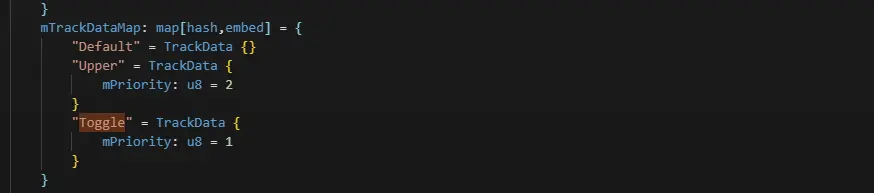
Cuối cùng, thêm mục này vào mTrackDataMap:
"Toggle" = TrackData {
    mPriority: u8 = 1
}
Nó sẽ trông như thế này:
Vậy là xong :P