
Make Your Mod Work on Every Skin with NoSkinLite
Use Quartz's NoSkinLite to copy your skin0 BIN into every skin and chroma slot, so your mod shows up whatever skin is equipped.
Install Quartz before starting this tutorial.
Custom skins are safe on every region except Korea and China. Never test custom skins on Korean or Chinese servers. The anti-cheat there blocks all mods and bans accounts.
A mod built on skin0.bin only replaces the base skin. If you equip any other skin or chroma in game, the mod doesn't show up. NoSkinLite fixes that by copying your skin0.bin into every other skin slot for that champion.
Find your skin0 BIN
In your mod's files, open the champion's skins folder:
data/characters/<champion>/skinsNoSkinLite reads the champion name from this path, so keep the folder structure as it is.
Run NoSkinLite
Right-click skin0.bin and select Quartz → NoSkinLite.
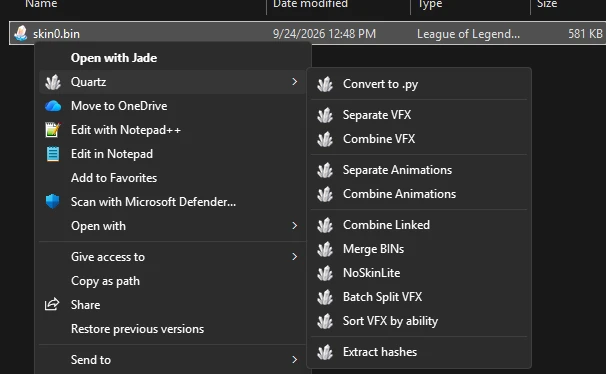
On Windows 11, click Show more options first. If it still isn't there, open Quartz settings and turn on Explorer Integration under Windows Integration.
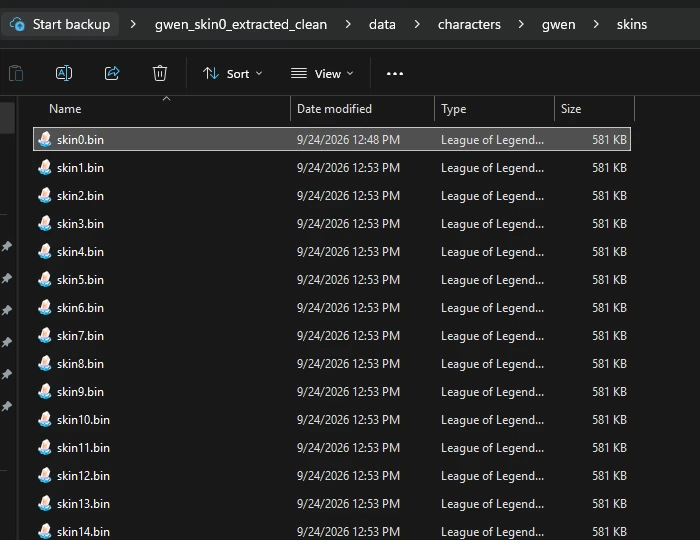
Quartz creates skin1.bin, skin2.bin and so on in the same folder, one for every skin and chroma the champion has, plus some spare slots for future skins. If you see these new files, it worked.
Champions with extra folders
Some champions have more than one folder in data/characters, for example Shaco's box (shacobox) or Zed's shadow (zedshadow). Each of these has its own skin0.bin. Run NoSkinLite on those too, or they'll only look right on the base skin.
NoSkinLite never overwrites a skinN.bin that already exists. If you change
skin0.bin later, delete the generated files first and run NoSkinLite again,
or the other skins keep the old version.