
CTRL+5 Toggle
Add a CTRL+5 submesh toggle to a League of Legends mod with Jade and an animation graph.
Add a CTRL+5 toggle to a mod using only Jade.
This guide shows how to add a CTRL+5 toggle like the one in this video:
First, add initialSubmeshToHide inside skinMeshProperties. Replace
YourSubmesh with the submesh you want hidden by default.
initialSubmeshToHide: string = "YourSubmesh"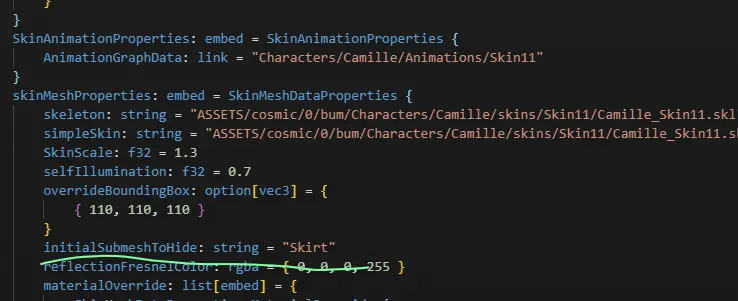
In AnimationGraphData, add the following entries to mClipDataMap. The
mCascadeBlendValue and mClipDataMap lines show where the entries belong.
Do not create a second mClipDataMap if the field already exists.
      mCascadeBlendValue: f32 = 0
            mClipDataMap: map[hash,pointer] = {
                "Toggle" = ConditionBoolClipData {
                    Updater: pointer = LogicDriverBoolParametricUpdater {
                        driver: pointer = SubmeshVisibilityBoolDriver {
                            Submeshes: list[hash] = {
                                "Skirt"
                            }
                            VISIBLE: bool = false
                        }
                    }
                    mTrueConditionClipName: hash = 0xbe8683f0
                    mFalseConditionClipName: hash = 0x8aa48b13
                }
                0xbe8683f0 = ParallelClipData {
                    mFlags: u32 = 14
                    mClipNameList: list[hash] = {
                        0x43191761
                    }
                }
                0x43191761 = AtomicClipData {
                    mFlags: u32 = 14
                    mTrackDataName: hash = "Toggle"
                    mMaskDataName: hash = "Default"
                    mEventDataMap: map[hash,pointer] = {
                        "Fade" = ParticleEventData {
                            mEffectKey: hash = 0xcef6c126
                            mParticleEventDataPairList: list[embed] = {
                                ParticleEventDataPair {
                                    mBoneName: hash = "C_Buffbone_GLB_Layout_Loc"
                                }
                            }
                            mIsLoop: bool = false
                            mIsKillEvent: bool = false
                        }
                        0x38503e10 = SubmeshVisibilityEventData {
                            mShowSubmeshList: list[hash] = {
                                "Skirt"
                            }
                            mHideSubmeshList: list[hash] = {
                                0x8ba930d1
                            }
                        }
                    }
                    mAnimationResourceData: embed = AnimationResourceData {
                        mAnimationFilePath: string = "ASSETS/cosmic/0/bum/Characters/camille/Skins/Base/Animations/camille_Taunt.anm"
                    }
                }
                0x8aa48b13 = ParallelClipData {
                    mFlags: u32 = 14
                    mClipNameList: list[hash] = {
                        0x04acc354
                    }
                }
                0x04acc354 = AtomicClipData {
                    mFlags: u32 = 14
                    mTrackDataName: hash = "Toggle"
                    mMaskDataName: hash = "Default"
                    mEventDataMap: map[hash,pointer] = {
                        "FadeOut" = ParticleEventData {
                            mEffectKey: hash = 0xe271f27c
                            mParticleEventDataPairList: list[embed] = {
                                ParticleEventDataPair {
                                    mBoneName: hash = "C_Buffbone_GLB_Layout_Loc"
                                }
                            }
                            mIsLoop: bool = false
                            mIsKillEvent: bool = false
                        }
                        "Hide_Mesh" = SubmeshVisibilityEventData {
                            mHideSubmeshList: list[hash] = {
                                "Skirt"
                            }
                            mShowSubmeshList: list[hash] = {
                                0x8ba930d1
                            }
                        }
                    }
                    mAnimationResourceData: embed = AnimationResourceData {
                        mAnimationFilePath: string = "ASSETS/cosmic/0/bum/Characters/camille/Skins/Base/Animations/camille_taunt.anm"
                    }
                }
            }
Replace every "Skirt" string with the submesh you want to toggle. The sample
also switches the submesh identified by 0x8ba930d1 in the opposite direction.
Replace that hash with your second submesh's name or hash. Remove those entries
if you only need to show and hide one submesh.
Change both mAnimationFilePath values to an animation that exists for your
champion. An invalid path can make the toggle fail or crash the game.
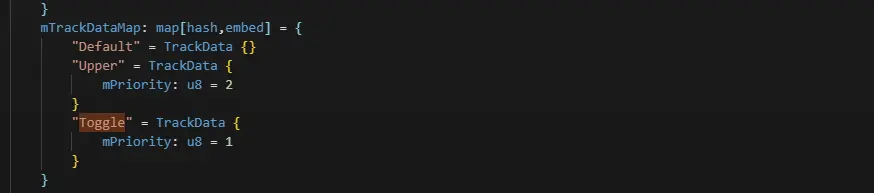
Finally, add this entry to mTrackDataMap:
"Toggle" = TrackData {
    mPriority: u8 = 1
}
It should look like this:
And that's it :P