
Bascule CTRL+5
Ajoute une bascule de submesh avec CTRL+5 à un mod League of Legends grâce à Jade et à un graphe d'animation.
Ajoute une bascule CTRL+5 à un mod en utilisant seulement Jade.
Ce guide t'explique comment ajouter une bascule CTRL+5 comme celle de cette vidéo :
Commence par ajouter initialSubmeshToHide dans skinMeshProperties. Remplace
YourSubmesh par le submesh qui doit être caché par défaut.
initialSubmeshToHide: string = "YourSubmesh"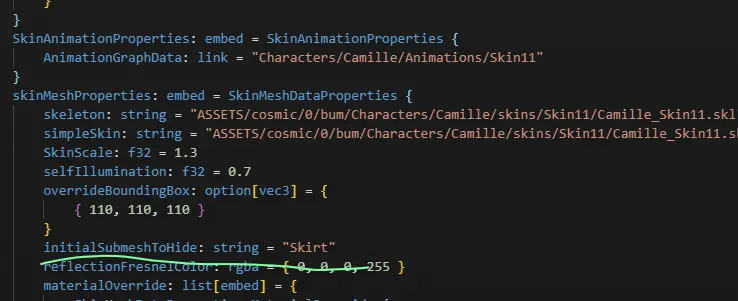
Dans AnimationGraphData, ajoute les entrées suivantes à mClipDataMap. Les
lignes mCascadeBlendValue et mClipDataMap t'indiquent où placer les entrées.
Ne crée pas un second mClipDataMap si le champ existe déjà.
      mCascadeBlendValue: f32 = 0
            mClipDataMap: map[hash,pointer] = {
                "Toggle" = ConditionBoolClipData {
                    Updater: pointer = LogicDriverBoolParametricUpdater {
                        driver: pointer = SubmeshVisibilityBoolDriver {
                            Submeshes: list[hash] = {
                                "Skirt"
                            }
                            VISIBLE: bool = false
                        }
                    }
                    mTrueConditionClipName: hash = 0xbe8683f0
                    mFalseConditionClipName: hash = 0x8aa48b13
                }
                0xbe8683f0 = ParallelClipData {
                    mFlags: u32 = 14
                    mClipNameList: list[hash] = {
                        0x43191761
                    }
                }
                0x43191761 = AtomicClipData {
                    mFlags: u32 = 14
                    mTrackDataName: hash = "Toggle"
                    mMaskDataName: hash = "Default"
                    mEventDataMap: map[hash,pointer] = {
                        "Fade" = ParticleEventData {
                            mEffectKey: hash = 0xcef6c126
                            mParticleEventDataPairList: list[embed] = {
                                ParticleEventDataPair {
                                    mBoneName: hash = "C_Buffbone_GLB_Layout_Loc"
                                }
                            }
                            mIsLoop: bool = false
                            mIsKillEvent: bool = false
                        }
                        0x38503e10 = SubmeshVisibilityEventData {
                            mShowSubmeshList: list[hash] = {
                                "Skirt"
                            }
                            mHideSubmeshList: list[hash] = {
                                0x8ba930d1
                            }
                        }
                    }
                    mAnimationResourceData: embed = AnimationResourceData {
                        mAnimationFilePath: string = "ASSETS/cosmic/0/bum/Characters/camille/Skins/Base/Animations/camille_Taunt.anm"
                    }
                }
                0x8aa48b13 = ParallelClipData {
                    mFlags: u32 = 14
                    mClipNameList: list[hash] = {
                        0x04acc354
                    }
                }
                0x04acc354 = AtomicClipData {
                    mFlags: u32 = 14
                    mTrackDataName: hash = "Toggle"
                    mMaskDataName: hash = "Default"
                    mEventDataMap: map[hash,pointer] = {
                        "FadeOut" = ParticleEventData {
                            mEffectKey: hash = 0xe271f27c
                            mParticleEventDataPairList: list[embed] = {
                                ParticleEventDataPair {
                                    mBoneName: hash = "C_Buffbone_GLB_Layout_Loc"
                                }
                            }
                            mIsLoop: bool = false
                            mIsKillEvent: bool = false
                        }
                        "Hide_Mesh" = SubmeshVisibilityEventData {
                            mHideSubmeshList: list[hash] = {
                                "Skirt"
                            }
                            mShowSubmeshList: list[hash] = {
                                0x8ba930d1
                            }
                        }
                    }
                    mAnimationResourceData: embed = AnimationResourceData {
                        mAnimationFilePath: string = "ASSETS/cosmic/0/bum/Characters/camille/Skins/Base/Animations/camille_taunt.anm"
                    }
                }
            }
Remplace chaque chaîne "Skirt" par le submesh que tu veux afficher et cacher.
L'exemple bascule aussi le submesh identifié par 0x8ba930d1 dans le sens inverse.
Remplace ce hash par le nom ou le hash de ton second submesh. Supprime ces entrées
si tu n'as besoin d'afficher et de cacher qu'un seul submesh.
Remplace les deux valeurs mAnimationFilePath par une animation qui existe pour
ton champion. Un chemin invalide peut empêcher la bascule de marcher ou faire
planter le jeu.
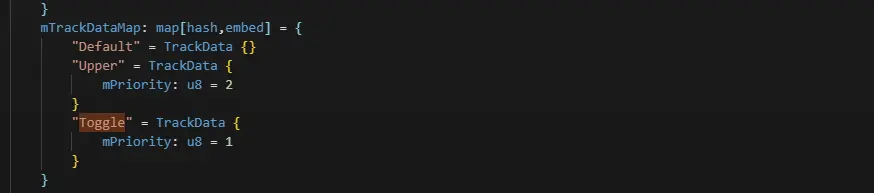
Pour finir, ajoute cette entrée à mTrackDataMap :
"Toggle" = TrackData {
    mPriority: u8 = 1
}
Tu dois obtenir ceci :
Et voilà :P