
Intermediate - Custom Banks
Guide on making custom audio banks with Wwise.
Required tools:
Wwise 2022.1.3Download from Audiokinetic. Use version 2022.1.3. League's current banks are built with Wwise 2022.1, and banks from other versions may not load.
Helpful resources:
Wwise 101Official beginner course. Watch it to learn how to use Wwise.
Wwise 201Official advanced course.
League Wwise Hierarchy ReferenceSee how the official banks are structured and what you can reuse to make your sounds better.
Custom Announcer Template by aurecueil and JessibeeFree template. Drop in your sounds to build a full custom announcer bank.
This guide covers building custom banks that work inside League's audio setup. For the basics of using Wwise, start with Wwise 101 above.
Bank Structure & Split Exports
League splits audio into two separate files:
audio.bnk/audio.wpk: contains media only (raw.wemaudio files).events.bnk: contains the logic hierarchy (events, action sequences, containers, switches, and bus routing).
Wwise's hierarchy is flat. Every element carries an ID and a ParentID. This makes it possible to inject new elements that attach themselves to existing parents in League's hierarchy without replacing the entire tree.
Splitting Audio and Events in Custom Banks
When generating SoundBanks, Wwise can bundle structure and media into a single bank. You can optionally split the audio from the events and structure. Splitting lets others edit your custom banks later with Quartz.
If you split, generate:
- An
_audio.bnkholding media only. - An
_events.bnkholding the structure and event definitions.
If you don't split, generate:
- An
_events.bnkholding the media, structure, and event definitions. In short, everything.
Project Hierarchy Best Practices
Avoid placing sound objects directly under a Work Unit:
❌ Bad:
Work Unit -> Sound SFX

✅ Good:
Work Unit -> Actor-Mixer -> Random / Sequence Container -> Sound SFX
Why Use Actor-Mixers?
An Actor-Mixer acts as a central controller for a character kit or spell group. You set the defaults on the Actor-Mixer once:
- Output bus routing (
daad0rhmfor SFX) - Attenuation sharesets
- Playback priority
- Base Make-up Gain
Child containers inherit these settings automatically. If one sound needs special behavior, enable Override parent on that specific child.
Adjust Volume with Make-up Gain
When balancing levels in Wwise, adjust Make-up Gain rather than Voice Volume. Voice Volume interacts with run-time faders and ducking headroom. Make-up Gain gives you clean, predictable static gain without clipping.
Adding Random Pitch Variation
Riot often applies a small random pitch change to repetitive actions so they feel natural (for example, Sett W cast variants or Grasp of the Undying procs):
- Select your container or sound object.
- Right-click the icon to the right of Pitch.
- Set a range, for example from
-100to+100cents.
Audio Routing: Output Buses
You can't modify or replace existing game buses. You can, however, route directly to existing buses or create your own child buses under them.
| Purpose | Bus name |
|---|---|
| Champion SFX (standard spell casts, impacts, and auto-attacks) | daad0rhm |
| Champion VO | vo_champions |
| Announcer callouts | vo_announcer_default |
| Champion theme music (create a custom child bus under this) | mus_champion |
| Background / map music | mus_map |
| Notifications & UI audio | sfx_hud |
| Tactical pings | sfx_pings |
| Ambient and environmental sound | sfx_environment |
| Teamfight Tactics music | tft_mus_default |
Champion combat sounds should always route to daad0rhm. Wet buses run
through global environmental reverb and distortion filters (such as Evelynn's
passive sound distortion). Routing to daad0rhm keeps your SFX clear.
Auto-Ducking Official Buses
If your custom sound needs to push down background audio (for example, a special ultimate voice line or a custom music track):
- Route your sound through a custom child bus.
- In your custom bus's Auto-Ducking tab, add the target official bus (for example,
mus_map). - Set the target bus to duck by Bus Volume, never Voice Volume. Ducking Voice Volume can make sounds that are already playing drop out entirely.
Positioning & Attenuation
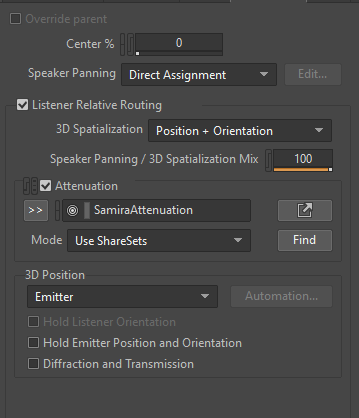
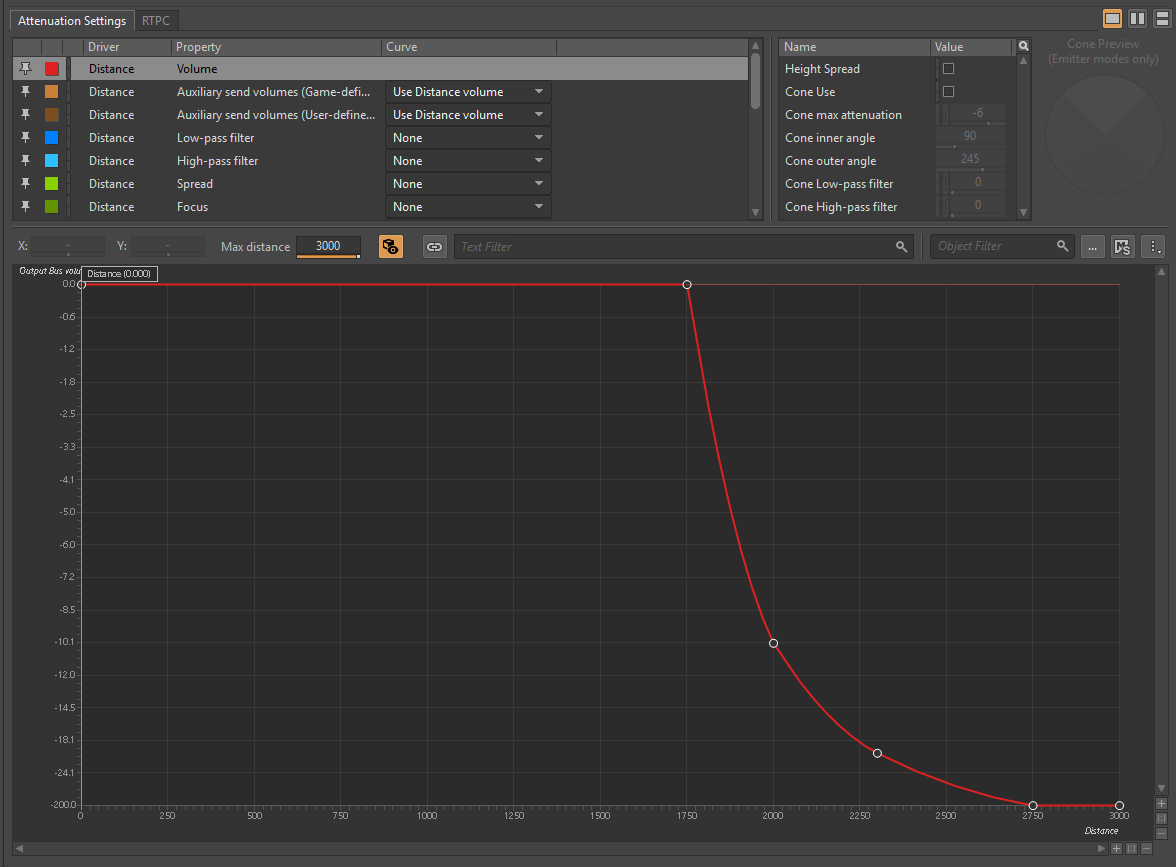
Attenuation controls how sound falls off over distance. Without attenuation, sounds play across the entire map at full volume.
Key Settings
- Distance units: Wwise distance units map directly to League's in-game range units (Flash range is 400; basic ranged attacks are 500 to 650).
- Disable Height Spread: League is played on a flat plane with an isometric camera. Always disable Height Spread in 3D positioning to prevent vertical panning glitches.
- Replicating official curves: You can't reference official attenuation assets by ID. Instead, check the League Wwise Hierarchy Reference to see the max distance, roll-off curves, and cones used by base champions, then recreate matching curves in your project's attenuation sharesets.
Loading Order & .bin Overrides
In League, first loaded wins. If two banks define the same element, the second one is silently discarded.
You set the loading order in the skin's .bin file:
bankPath: list[string] = {
    "ASSETS/Sounds/Wwise2016/VO/en_US/Characters/Yone/Skins/Base/Yone_Custom_VO_audio.bnk"  ← Custom bank loads first
    "ASSETS/Sounds/Wwise2016/VO/en_US/Characters/Yone/Skins/Base/Yone_Base_VO_audio.bnk"
    "ASSETS/Sounds/Wwise2016/VO/en_US/Characters/Yone/Skins/Base/Yone_Base_VO_audio.wpk"
    "ASSETS/Sounds/Wwise2016/VO/en_US/Characters/Yone/Skins/Base/Yone_Base_VO_events.bnk"
}
Bank Naming Rules
- Overriding official events: If you only replace events that already exist in the base game, your custom bank does not need
_eventsin its filename. The engine already registers those event names from the base game bank, so your bank intercepts them as long as it loads first. - Adding new events: If you add brand-new events the base champion doesn't have, your bank filename must contain
_events(for example,Yone_Custom_events.bnk). League's sound loader only reads event definitions from banks with_eventsin the filename. - Custom states and switches: Creating custom states or switches requires generating and loading an
Init.bnk. (Injecting or renaming a customInit.bnkin League is experimental and unverified. Use the existing official states and switches where you can.)
Misc Tip: Conversion Settings
You can use custom conversion settings in your Wwise project (Vorbis compression, lower quality or sample rate) to greatly reduce the final size of your exported .bnk and .wem files.
Guide by aurecueil