
Advanced - Reading and editing events.bnk
Advanced guide on how to interpret wwise banks
Required Tool
wwiserKey to reading events.bnk.
The Two Approaches at a Glance
| Wwise Replication | Binary Patching | |
|---|---|---|
| How it works | Rebuild the target hierarchy in Wwise, export a new bank | Edit raw byte values in the .bnk file directly |
| Speed | Slower to set up | Fast once you know the offsets |
| Control | High: full Wwise toolset available | Limited to the values you're patching |
| Game update stability | Stable: your project adapts | Fragile: offsets shift when the bank is rebuilt by Riot |
| Best for | Complex, long-term mods; anything that needs to be maintained | Quick tweaks; one-off adjustments; prototyping |
Use whichever fits your goal. They're not mutually exclusive. You might use an edited events.bnk for some events while replicating other events in Wwise.
Step 1: Generate a Hierarchy Dump
First, dump the hierarchy of the events bank you want to work with:
wwiser.py -d txt {input_events_bnk_file} -dn output.txtThis produces a human-readable text file showing the full Wwise object hierarchy inside that bank: events, containers, switches, sequences, busses, everything.
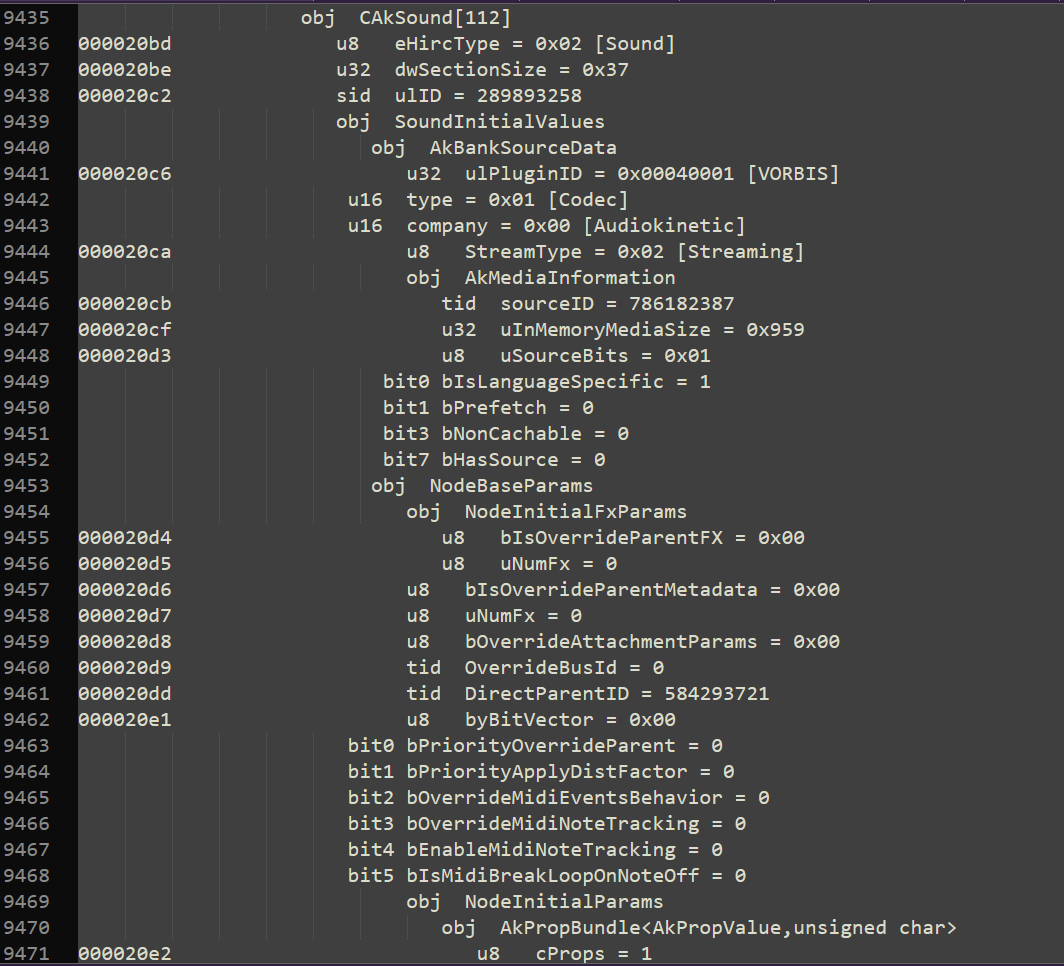
This dump is your map. Ctrl+F is your friend.
Technique 1: Replicating in Wwise
Once you have the dump, you can read the hierarchy and reconstruct the relevant parts of it in your own Wwise project.
Working with IDs:
Many elements in the hierarchy use Wwise's FNV-based name hash as their ID. You can convert any event name to its numeric ID using this function:
def wwise_hash(name: str) -> int:
    FNV32_OFFSET = 0x811C9DC5
    FNV32_PRIME  = 0x01000193
    h = FNV32_OFFSET
    for b in name.lower().encode("utf-8"):
        h = (h * FNV32_PRIME) & 0xFFFFFFFF
        h ^= b
    return h
Example:
Play_vo_Yone_Attack2DGeneral → 681920763For hierarchy elements that don't use name-based IDs (random containers,
sequence containers, etc.), you'll need to pull the raw ID values from the
wwiser dump and manually set them in your .wwu project files. This is the
fiddly part, but it's what allows your bank to properly override elements from
the original.
Once your project is set up, export your custom bank from Wwise and slot it into your mod using the loading order technique from the Intermediate section.
Stability note: Because you own the Wwise project, when Riot updates the game bank, you can re-dump the new version, compare the hierarchy, adjust your project, and re-export. It's extra work per update, but nothing starts from zero.
Technique 2: Binary Patching
Instead of rebuilding anything, binary patching lets you reach directly into the
.bnk file and change specific values at known byte offsets.
The wwiser dump includes byte offsets for every value in the file. Find the value you want to change, note its offset and data type, and write a patch.
Here's a ready-to-use patching script:
import struct

FILE_PATH = "mus_map11_seasonal_25s2_bloom_events.bnk"

patches = [
    {"offset": 0x000028ee, "type": "d64", "value": 1}
]

def patch_file(path):
    with open(path, "rb") as f:
        data = bytearray(f.read())

    for patch in patches:
        offset = patch["offset"]
        if patch["type"] == "u8":
            data[offset] = patch["value"]
        elif patch["type"] == "u16":
            data[offset:offset+2] = struct.pack("<H", patch["value"])
        elif patch["type"] == "float":
            data[offset:offset+4] = struct.pack("<f", patch["value"])
        elif patch["type"] == "u32":
            data[offset:offset+4] = struct.pack("<I", patch["value"])
        elif patch["type"] == "d64":
            data[offset:offset+8] = struct.pack("<d", patch["value"])
        elif patch["type"] == "set_bit":
            current = data[offset]
            current |= (1 << patch["bit"])
            data[offset] = current

    output_path = path.replace(".bnk", "_patched.bnk")
    with open(output_path, "wb") as f:
        f.write(data)

    print(f"Patched file saved as: {output_path}")

if __name__ == "__main__":
    patch_file(FILE_PATH)
Supported patch types:
| Type | Size | Use case |
|---|---|---|
u8 | 1 byte | Flags, small integers |
u16 | 2 bytes | Short integers |
u32 | 4 bytes | Most integer values |
float | 4 bytes | Volume, pitch, probability |
d64 | 8 bytes | Double-precision floats |
set_bit | 1 byte | Toggle a single bit flag |
To add more patches, just add entries to the patches list:
patches = [
    {"offset": 0x000028ee, "type": "d64",   "value": 1},
    {"offset": 0x00001a30, "type": "float",  "value": 0.75},
    {"offset": 0x00000c12, "type": "set_bit", "bit": 3},
]
Fragility note: When Riot rebuilds the events bank (patches, new seasons, content updates), every byte offset shifts. Your patch list becomes invalid and needs to be rebuilt from a fresh wwiser dump of the updated bank. Fast to write initially, but requires maintenance after game updates.
Choosing Between the Two
- Building a music or VO mod you want to maintain long-term? Set up the Wwise project. The upfront cost pays off.
- Making a quick experimental tweak, or testing whether a value change has the effect you expect? Binary patch it first, confirm it works, then decide if it's worth formalizing.
- Working on something event-driven and complex (randomized containers, switch containers, state machines)? You'll likely need the Wwise project. Binary patching becomes unwieldy fast.