
Start here
New to Deadlock modding? Learn what a mod can change, what is off limits, what you need, and which guide to follow first.
New to Deadlock modding? This page shows what a mod is, what you can make, and which guide to read first. You do not need any tools yet.
What a Deadlock mod is
A Deadlock mod is a .vpk file. It holds new copies of game files, such as a hero texture or a sound, at the same paths as the files they replace.
The game loads mods from one folder: game/citadel/addons/. A mod manager sets this up for you, or you can do it by hand.
Mods are client-side. They change the game on your PC only. How Deadlock mods work has the details.
What you can make
This wiki covers mods that change how the game looks and sounds:
- Hero skins, recolors, and materials.
- Sounds for your own hero, voice lines, and music.
- Hero portraits, icons, item art, and menu art.
- Text, such as item names.
We never cover mods that give you an advantage: timers, enemy info, louder enemy sounds, bright or see-through skins, smaller models. Step 1 of the learning path below lists them all.
What you need
To play with mods:

Deadlock Mod Manager installs mods for you. With a text editor, you install them by hand. Divine is adding Deadlock mods. When they arrive, you'll find them in Explore mods, and you'll publish yours from the Creator Panel.
To make your own mods:

The main creator tools run on Windows only. Source 2 Viewer opens and exports game files. CSDK 12, a free, unofficial community toolset, compiles your files. You need an image editor, such as GIMP or Photoshop, and an audio editor, such as Audacity. You need Blender only if you want to change 3D models.
Step 3 of the learning path walks you through each install.
Your learning path
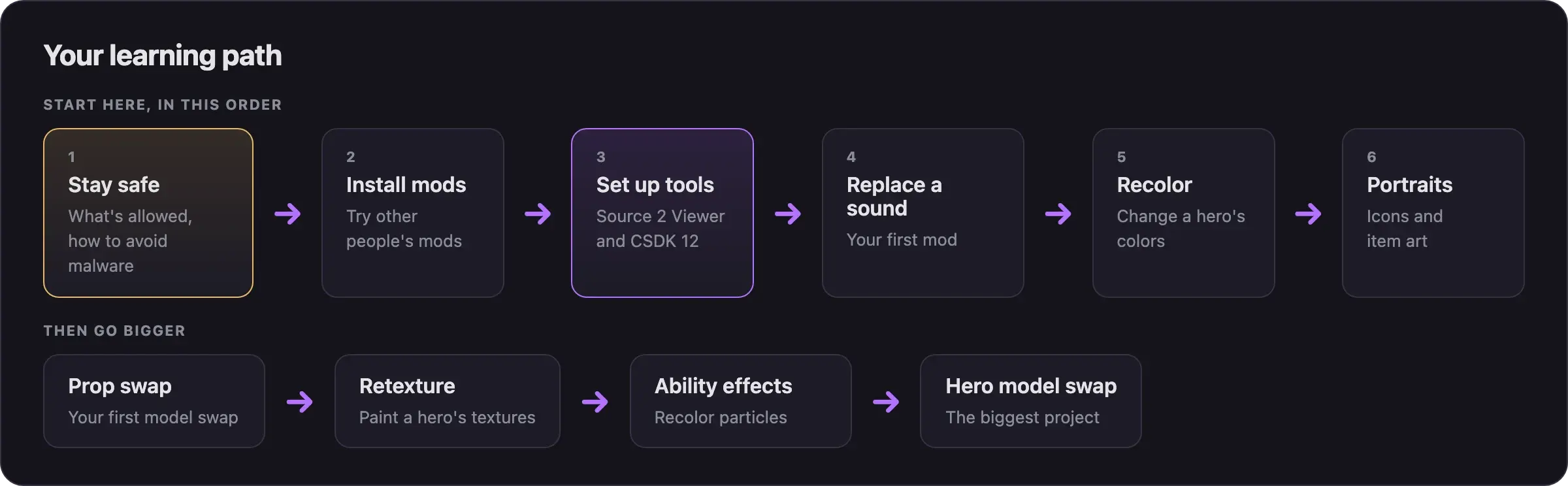
Follow these guides in order. Each one builds on the one before.
The rules, and how to avoid malware. Read this before you install anything.
Try other people's mods first, with Deadlock Mod Manager.
Install Source 2 Viewer and CSDK 12.
Your first mod.
Change a hero's colors.
Swap images in the menus.
Bigger projects
After your first mods, try these:
Replace a small model, such as the soul container.
Paint over a hero's textures.
Change the colors of an ability's effects.
Put a whole new model on a hero.
Stuck on a word or idea?
Mods, file paths, and VPK files, explained.
Frequently asked questions
Get help
Ask the Divine team and community about installing, making, or fixing a mod.
Ask other Deadlock creators for help. It may ask you to verify through Valve's official Deadlock Discord first.
Where to ask questions, and what to include when you do.
For crashes and mods that do not load.
Credits
This page is based on the work of these creators. Check out their original pages.
- Site: Deadlock section on GameBanana.
- Rules: Deadlock section rules by the GameBanana Deadlock section managers.
- Guide: Deadlock Modding Notes by the Deadlock Modding community.
- Reference: Deadlock on the Valve Developer Community wiki.