
Toggle com CTRL+5
Adicione um toggle de submesh com CTRL+5 a um mod de League of Legends usando Jade e um animation graph.
Adicione um toggle com CTRL+5 a um mod usando só o Jade.
Este guia mostra como adicionar um toggle com CTRL+5 como o deste vídeo:
Primeiro, adicione initialSubmeshToHide dentro de skinMeshProperties. Troque
YourSubmesh pela submesh que deve começar escondida.
initialSubmeshToHide: string = "YourSubmesh"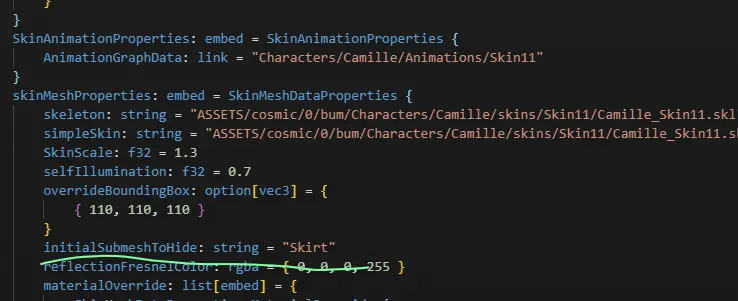
Em AnimationGraphData, adicione as entradas abaixo ao mClipDataMap. As linhas
mCascadeBlendValue e mClipDataMap mostram onde elas devem ficar. Não crie um
segundo mClipDataMap se esse campo já existir.
      mCascadeBlendValue: f32 = 0
            mClipDataMap: map[hash,pointer] = {
                "Toggle" = ConditionBoolClipData {
                    Updater: pointer = LogicDriverBoolParametricUpdater {
                        driver: pointer = SubmeshVisibilityBoolDriver {
                            Submeshes: list[hash] = {
                                "Skirt"
                            }
                            VISIBLE: bool = false
                        }
                    }
                    mTrueConditionClipName: hash = 0xbe8683f0
                    mFalseConditionClipName: hash = 0x8aa48b13
                }
                0xbe8683f0 = ParallelClipData {
                    mFlags: u32 = 14
                    mClipNameList: list[hash] = {
                        0x43191761
                    }
                }
                0x43191761 = AtomicClipData {
                    mFlags: u32 = 14
                    mTrackDataName: hash = "Toggle"
                    mMaskDataName: hash = "Default"
                    mEventDataMap: map[hash,pointer] = {
                        "Fade" = ParticleEventData {
                            mEffectKey: hash = 0xcef6c126
                            mParticleEventDataPairList: list[embed] = {
                                ParticleEventDataPair {
                                    mBoneName: hash = "C_Buffbone_GLB_Layout_Loc"
                                }
                            }
                            mIsLoop: bool = false
                            mIsKillEvent: bool = false
                        }
                        0x38503e10 = SubmeshVisibilityEventData {
                            mShowSubmeshList: list[hash] = {
                                "Skirt"
                            }
                            mHideSubmeshList: list[hash] = {
                                0x8ba930d1
                            }
                        }
                    }
                    mAnimationResourceData: embed = AnimationResourceData {
                        mAnimationFilePath: string = "ASSETS/cosmic/0/bum/Characters/camille/Skins/Base/Animations/camille_Taunt.anm"
                    }
                }
                0x8aa48b13 = ParallelClipData {
                    mFlags: u32 = 14
                    mClipNameList: list[hash] = {
                        0x04acc354
                    }
                }
                0x04acc354 = AtomicClipData {
                    mFlags: u32 = 14
                    mTrackDataName: hash = "Toggle"
                    mMaskDataName: hash = "Default"
                    mEventDataMap: map[hash,pointer] = {
                        "FadeOut" = ParticleEventData {
                            mEffectKey: hash = 0xe271f27c
                            mParticleEventDataPairList: list[embed] = {
                                ParticleEventDataPair {
                                    mBoneName: hash = "C_Buffbone_GLB_Layout_Loc"
                                }
                            }
                            mIsLoop: bool = false
                            mIsKillEvent: bool = false
                        }
                        "Hide_Mesh" = SubmeshVisibilityEventData {
                            mHideSubmeshList: list[hash] = {
                                "Skirt"
                            }
                            mShowSubmeshList: list[hash] = {
                                0x8ba930d1
                            }
                        }
                    }
                    mAnimationResourceData: embed = AnimationResourceData {
                        mAnimationFilePath: string = "ASSETS/cosmic/0/bum/Characters/camille/Skins/Base/Animations/camille_taunt.anm"
                    }
                }
            }
Troque todas as strings "Skirt" pela submesh que você quer mostrar e esconder. O
exemplo também faz o inverso com a submesh identificada por 0x8ba930d1. Troque
esse hash pelo nome ou hash da sua segunda submesh. Remova essas entradas se você
só precisa mostrar e esconder uma submesh.
Troque os dois valores de mAnimationFilePath por uma animação que exista para
o seu campeão. Um caminho inválido pode fazer o toggle falhar ou o jogo crashar.
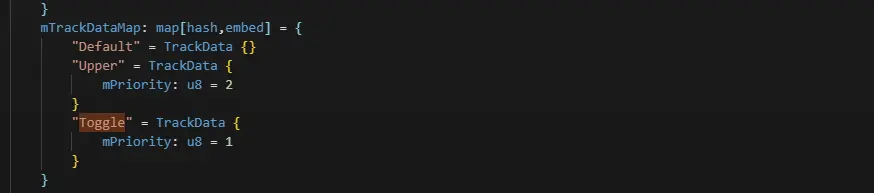
Por fim, adicione esta entrada ao mTrackDataMap:
"Toggle" = TrackData {
    mPriority: u8 = 1
}
Deve ficar assim:
E é isso :P