
Tools
Every tool Deadlock creators use, which ones to install first, which ones to skip, and how they fit together from extract to pack.
A Deadlock mod takes a few free tools. Each row below says what a tool does. Click it for the full guide.
New here? Install the two Required tools first. They cover sounds, recolors, textures, icons, and item art.
Valve has not released modding tools for Deadlock. The Valve Developer Community wiki lists its mod support as "Unsupported" and its SDK as "None". The game ships a resource compiler, but no editors.
So creators use community tools. The main one, CSDK 12, is Valve's Counter-Strike 2 tools adapted for Deadlock. Every tool on these pages is unofficial, and most of them run on Windows only.
How the tools fit together
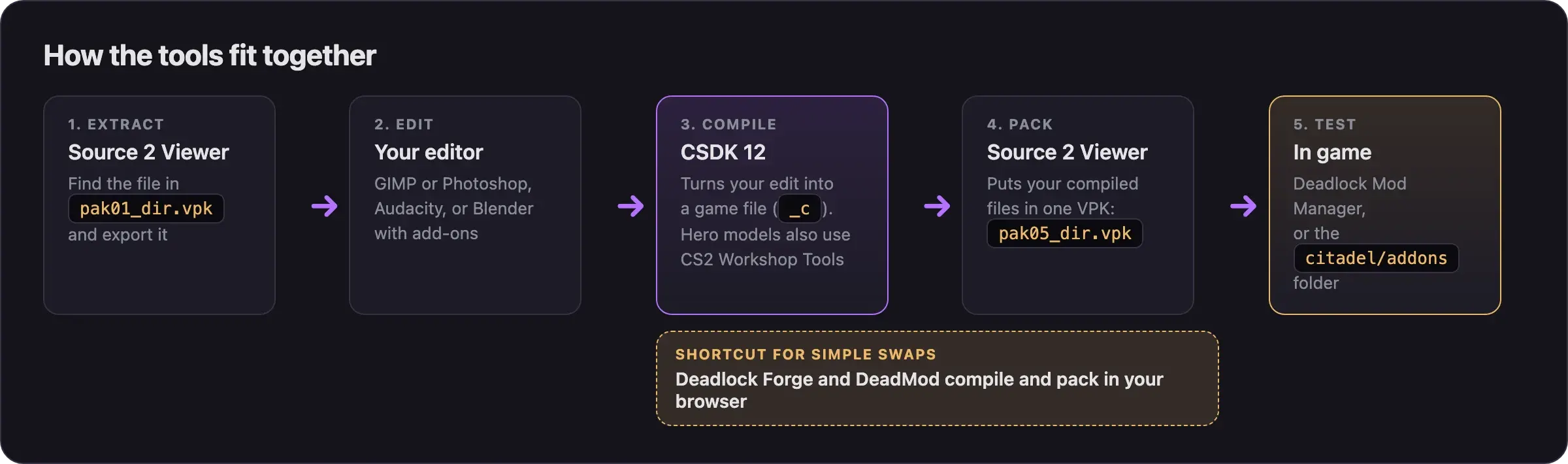
Every mod passes through the same five stages. The tool changes with the file type, but the order stays the same. How Deadlock mods work explains why compiled files and VPKs matter.
Beginner toolchain
Install these first.
Source 2 Viewer
Opens the game's files. Previews, exports, and decompiles them, and packs your mod into a VPK.
Required CSDK 12Community build of Valve's Source 2 tools. Compiles your edited files so the game can read them.
Required Browser buildersDeadlock Forge and DeadMod build simple sound, icon, and texture mods in your browser.
No install Mod managers
Deadlock Mod Manager and Grimoire install and switch mods. Use one to test your own.
Editors for your files
Any editor that saves the right file type works. These are the common picks.
GIMPImage editor for textures, icons, and item art. Photoshop works too.
Free AudacitySound editor for your audio files.
Free Notepad++Text editor, for small edits to tool files.
VS CodeText editor, for small edits to tool files.
Advanced toolchain
Add these when you move on to models and animations.
Blender and add-onsEdit 3D models. BlenderSource2Tools exports DMX, SourceIO imports game models, and PulseSrcOps handles animations.
CS2 Workshop ToolsValve's free Counter-Strike 2 tools. Hero model swaps use them for the AnimGraph 2 setup that CSDK 12 cannot do.
Advanced Helper tools and scriptsBuild scripts, VPK merging, AnimGraph 2 helpers, and a tracker that shows what each update changed.
AdvancedTwo more extras live on the tool pages above. The Source 2 Viewer command line handles batch exports. CSDK 12 can take the full game files, which you need only for maps, posing, and in-engine previews.
Tools to skip
| Skip this | Why | Use instead |
|---|---|---|
| CSDK 10 | Outdated. Its own page points to CSDK 12. Some older tutorials still use it. | CSDK 12 |
| The original Blender Source Tools | Lacks the Source 2 fixes Deadlock models need. | BlenderSource2Tools, a Source 2 fork |
Valve's vpk.exe | Has no Source 2 docs. No Deadlock guide uses it. | Source 2 Viewer or CSDK 12 |
| Valve tools repacked by unknown uploaders | You cannot check what is inside. | The official CS2 Workshop Tools |
| Anything sold as a "mod menu", ESP, or a "Deadlock 2026" toolkit | These are tools for unfair play, or they carry malware. | Nothing. Never download them. |
How to spot a real tool
- Real creator tools are open-source projects from known authors, most often on GitHub.
- Download each tool from the link on its wiki page, not from a search result or a video comment.
- A tool can be an
.exe. A mod never is. What's allowed and how to stay safe explains how to check a mod download.
Next steps
Install Source 2 Viewer and CSDK 12 step by step, and create your first addon.
Credits
This page is based on the work of these creators. Check out their original pages.
- Reference: Deadlock on the Valve Developer Community wiki.
- Guide: CSDK 12 from Deadlock Modding Notes.
- Guide: Neutral's General Guide for Modding Deadlock by Neutraldrift.
- Guide: From Start to Finish (Fuji's Asset Replacement Guide) by Fuji (FellOffFuji).
- Tool: Source 2 Viewer by the ValveResourceFormat team.
- Site: Deadlock tools on GameBanana.