
Helper tools and scripts
Optional tools for advanced creators: a build script, VPK merging, an AnimGraph 2 helper, and a tracker that shows what each game update changed.
You can make every Deadlock mod with Source 2 Viewer and CSDK 12. The tools on this page save time once you know the basics. Learn to pack a VPK by hand first, so you can tell when a helper gets something wrong.
Every tool here is free, has public source code, and comes from a named community author. Valve does not make or support any of them. They are small projects, so back up your work before you run them.
What you need

Set up both tools first: CSDK 12 compiles your files, and Source 2 Viewer exports and packs them. You should already know how to compile and pack a mod by hand.
At a glance
| Tool | What it does | Runs on | License |
|---|---|---|---|
| DeadPacker | Compiles, packs, copies, and restarts the game in one run | Windows | MIT |
| vpkmerge | Merges several VPKs into one, or splits one apart | Windows, macOS, Linux | MIT |
| DeadlockTools | Adds AnimGraph 2 references to a compiled hero model | Windows, Linux | MIT |
| GameTracking-Deadlock | Shows which game files each update changed | Your browser (GitHub) | Not stated |
Build automation: DeadPacker
DeadPackerOne run compiles your addon, packs it, copies it to the game, and restarts Deadlock. By Artemon121.
UnofficialYou write a short .toml file that lists the steps, then drag it onto DeadPacker.exe. The steps are:
| Name | Description |
|---|---|
| compile | Compiles your addon. |
| pack | Packs it into a VPK. Takes an exclude list, so leave out cache files such as cache_*.soc and tools_thumbnail_cache.bin. |
| copy | Copies the VPK to the game. |
| close_deadlock | Closes Deadlock. |
| launch_deadlock | Starts Deadlock again. |
It is best for a fast test loop. Each run replaces your test build in addons and opens the game again.
- The last release is from November 2025. Check that the compiler path in your
.tomlpoints to your CSDK 12 folder. - Some older guides pair DeadPacker with CSDK 10. Use CSDK 12 instead.
- Its example file starts Deadlock with developer launch options and a private map. Use them for testing only. Then follow Before you queue again.
Merge VPKs: vpkmerge
vpkmergeMerges several VPKs into one, or splits one apart. App and command line. By Slush97, who also makes Grimoire.
UnofficialUse it when you hit the 99-VPK limit, or when you want to ship a mod as one file. Grimoire has the same merge built in.
- Its author calls the app version very early. Keep copies of the VPKs you merge.
- It has other features too. This page covers merging only.
- Read the rules in Combine several mods into one VPK before you merge. That section also shows how to merge by hand with Source 2 Viewer.
AnimGraph 2 helper: DeadlockTools
DeadlockToolsA command line tool for compiled hero models. By dotryen.
UnofficialA hero model must point to the hero's AnimGraph 2 (AG2) skeleton and graphs. CSDK 12 cannot compile those references. Most guides use CS2 Workshop Tools for that last compile. DeadlockTools is the other route:
add ag2writes the AG2 references into a.vmdl_cyou already compiled in CSDK 12.fix unitstatusfixes a CSDK 12 bug in the unit status data. That data sets things like the health bar height.
Its author warns that the file-writing features are experimental, and that files can double in size. The last release is from April 2026, before the City Never Sleeps update. Test the result in game before you publish.
See what an update changed: GameTracking-Deadlock
GameTracking-DeadlockA bot saves Deadlock's file lists and game data after every update. Run by SteamTracking, the team behind SteamDB.
Community projectIn the commit list, each title starts with the game build number. Open the history of a file to see which updates touched it. Then you know which of your mods to check.
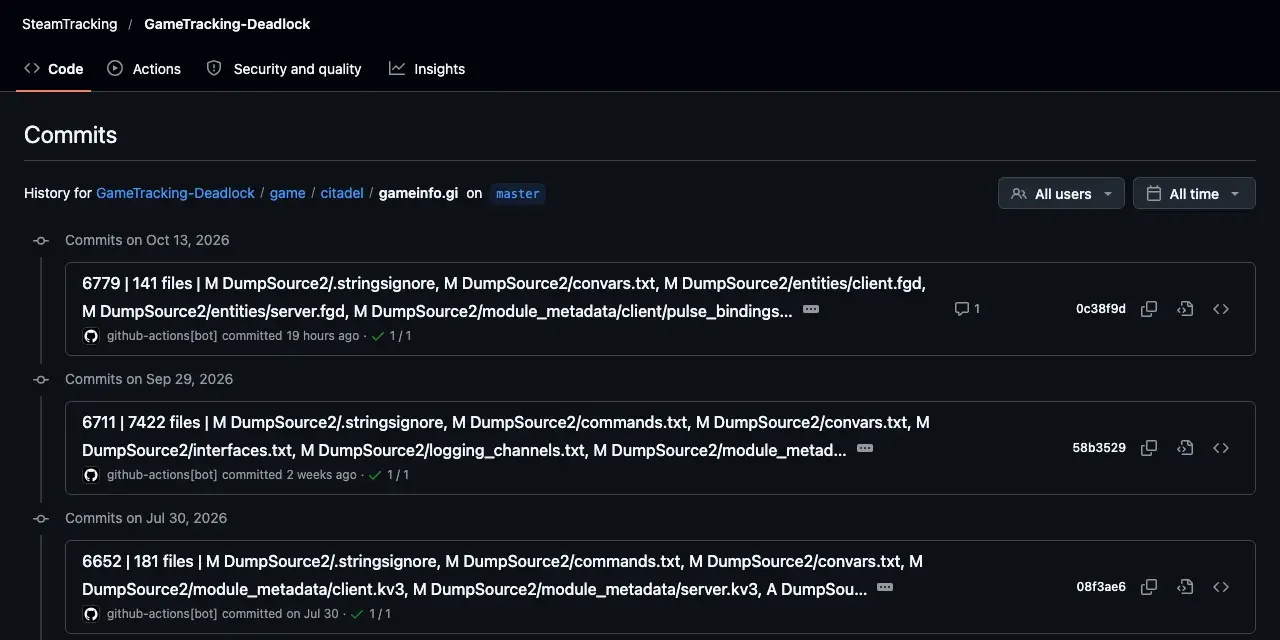
It mirrors Valve's game files. Use it to read what changed, never as a source of files for your mod. Update your mod after a game update shows the full check.
Tools we leave out
We only list tools that pass all of these checks. Anything else stays off this wiki, however popular:
- Public source code. Some tools are shared only as Discord files.
- No changes that shrink, remove, or hide parts of a model. A smaller or missing part can give a player an unfair advantage. See What's allowed.
- No repacks of Valve's tools on file-sharing sites, other than CSDK 12.
- No unfair-advantage features, no malware, and no lookalikes of real tools.
- A track record. Brand-new tools join the list once people use them.
Next steps
Every tool and how they fit together.
The manual way these helpers speed up.
Where the AG2 step fits.
Credits
This page lists the work of these creators. Check out their original tools.
- Tool: DeadPacker by Artemon121.
- Tool: vpkmerge by Slush97.
- Tool: DeadlockTools by dotryen.
- Tool: GameTracking-Deadlock by SteamTracking.