
Make mods without installing tools
Build simple sound, icon, and texture mods in your browser with Deadlock Forge and DeadMod. A fast first mod, with clear limits.
Two websites build simple mods for you: Deadlock Forge and DeadMod. You give them your sound or image, and they give you a ready VPK file. You do not need CSDK 12. Set up mods in your game first with Deadlock Mod Manager or by hand, so you can test the result.
What you need

Use files you made or have permission to use. For DeadMod, Source 2 Viewer exports the original texture you edit, and your image editor must keep transparency, such as GIMP, Krita, or Photoshop.
When a builder is enough
| You want to | Use |
|---|---|
| Replace one sound: an ability, a voice line, music, a UI click | Sound Forge on Deadlock Forge |
| Replace shop item art | Item Forge on Deadlock Forge |
| Replace a hero portrait, ability icon, or minimap dot | Texture Forge on Deadlock Forge |
| Recolor or repaint a hero texture | DeadMod |
| Change a model, material values, particles, or the HUD | The full tools. Start with CSDK 12. |
Both sites are unofficial community tools. Neither one is a mod host: they build your file, and you install it yourself.
Do not make enemy sounds louder, longer, or clearer. Do not make icons, minimap dots, or hero textures brighter, glowing, see-through, or very dark. These change what you can see or hear in a fight. Read What's allowed and how to stay safe.
Deadlock Forge
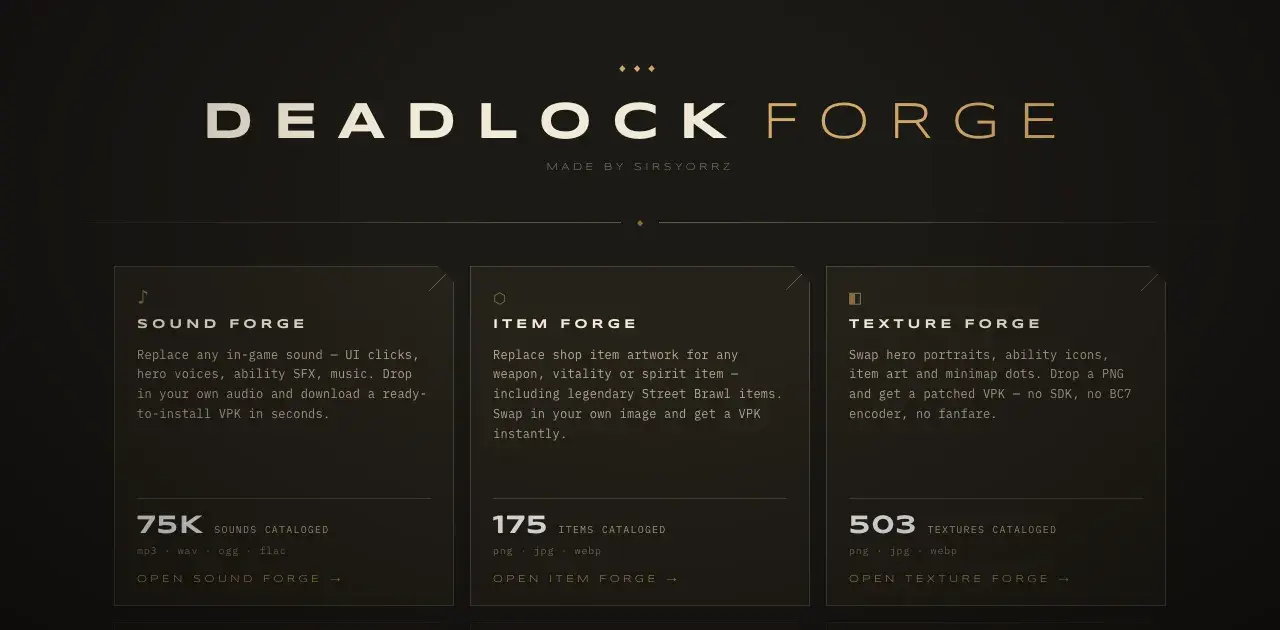
Deadlock Forge by Sirsyorrz has three builders. Each row opens one.
Sound ForgeReplaces a sound. Takes mp3, wav, ogg, or flac, and lets you trim the sound and set its volume.
Item ForgeReplaces shop item art. Takes png, jpg, or webp.
Texture ForgeReplaces hero portraits, ability icons, item art, and minimap dots. Takes png, jpg, or webp.
To build a sound mod:
- Open Sound Forge.
- Filter by category or hero, or search by file name. Click the play button to listen.
- Click the sound you want to replace.
- Drop in your audio file. Trim it and set the volume close to the original.
- Click Forge VPK and download the file.
- Name the file like
pak05_dir.vpkif it has another name. The rules are in Pack your mod into a VPK.
Item Forge and Texture Forge work the same way: pick the image, upload yours, and download the VPK. The portraits and icons guide in Next steps covers which image is which.
DeadMod
DeadModBuilds texture mods in your browser. By RedMser.
DeadMod does not come with the game's images. You export the original texture with Source 2 Viewer, edit it, and DeadMod packs it. It supports textures only for now.
Export the texture
- In Source 2 Viewer, find the texture. A model's References tab lists its materials. Open a material to see which textures it uses.
- Right-click the texture, choose Decompile & export, and save it as PNG.
Edit it
- Edit the PNG. Keep the same size.
- Keep the transparency. When you export the PNG in GIMP, tick Save color values from transparent pixels, or see-through areas turn black.
Pack it in DeadMod
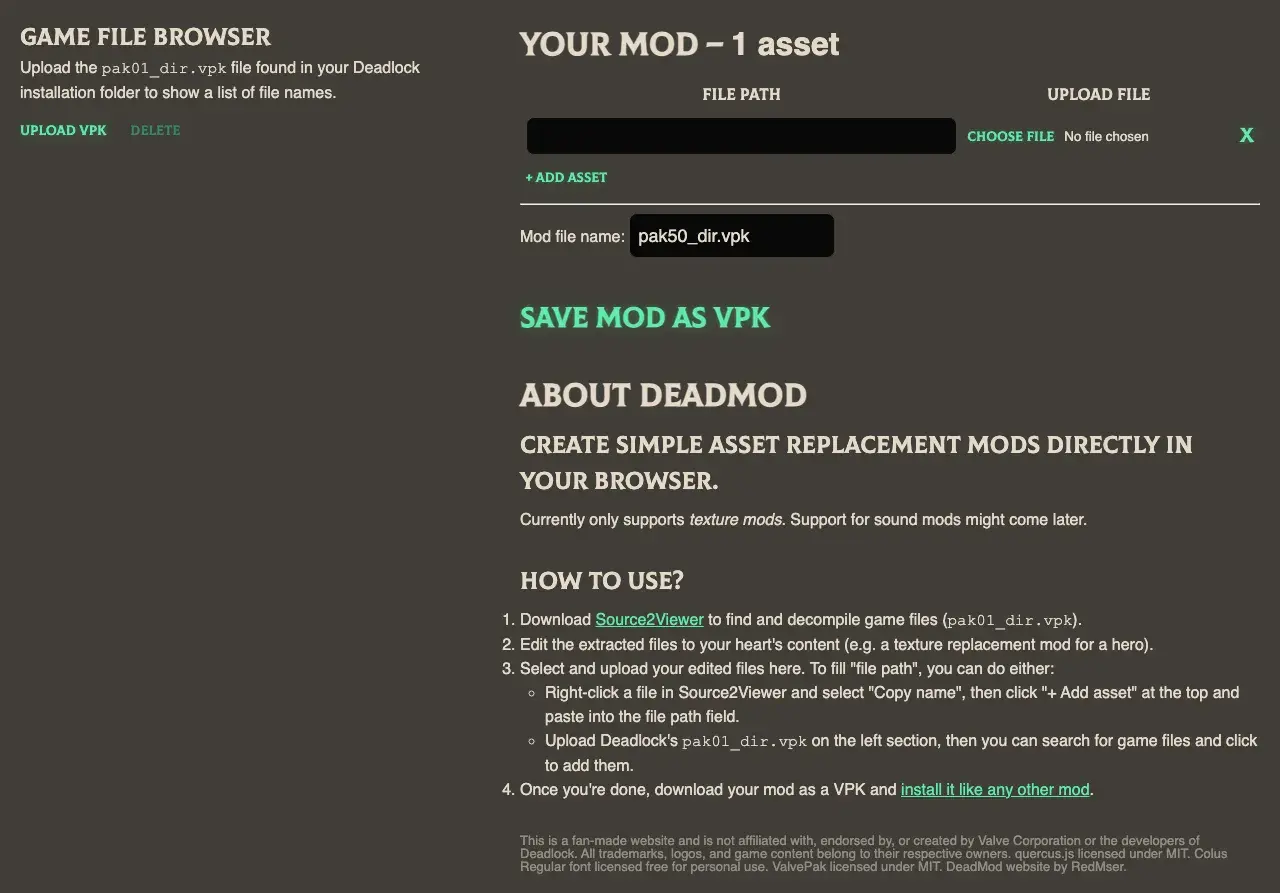
- Open DeadMod. Click Upload VPK and pick the game's
pak01_dir.vpk. DeadMod then lists the game's files so you can search them. - Click a file to add it. Or click + Add asset and paste its path. To copy a path, right-click the file in Source 2 Viewer and choose Copy name.
- Click Choose file next to the path and pick your edited PNG.
- Check Mod file name. It starts as
pak50_dir.vpk. - Click Save mod as VPK.
RedMser's video shows the whole process, from Source 2 Viewer to the result in game:
Mod Foundry in Deadlock Mod Manager
Mod Foundry
Deadlock Mod Manager's built-in mod builder.
ExperimentalAlready use Deadlock Mod Manager? Its experimental Mod Foundry recolors a hero's body and weapon, swaps hero cards and sounds, and exports a VPK. Open Settings, then Experimental, then Mod Foundry. The Mod Foundry docs explain the options.
The fairness rules above apply here too.
Limits of builders
- They only change files they know about. Deadlock Forge works from its own list. DeadMod swaps textures only.
- They cannot change models, material values, particles, or HUD layouts.
- Sound Forge swaps one sound file. For random sounds or soundevent edits, see Play random sounds with soundevents.
- You do not choose what goes into the VPK. Open it in Source 2 Viewer to check, as the packing guide shows.
- Game updates can move or rename files. If your mod stops working after an update, build it again.
Check the result in game
- Install the VPK with Deadlock Mod Manager or by hand.
- Load a private map and look for your change. Test your mod in game shows how.
- Nothing changed? Work through Mods not loading.
Next steps
Ready for the full tools? Pick the guide for your mod type.
Swap one ability sound or music track with CSDK 12.
Make custom portraits, minimap icons, ability icons, and item art.
Paint over a hero's textures and rebuild the material.
Credits
This guide is based on the work of these creators. Check out their original guides.
- Video: DeadMod: Make new Deadlock texture mods in minutes by RedMser.
- Video: How to Make Custom Sound Mods in Deadlock / Random Audio & Sound Switches by Adamtheboss9.
- Tool: Deadlock Forge by Sirsyorrz. Also on GameBanana as DeadlockForge - web based modding tool.
- Tool: DeadMod by RedMser.
- Docs: Customization (Mod Foundry) from the Deadlock Mod Manager docs.