
Blender and add-ons for Deadlock
Which Blender version and add-ons Deadlock creators use: BlenderSource2Tools for DMX export, SourceIO for imports, PulseSrcOps for animation.
The 3D editor for model and animation work. The add-ons below connect it to Source 2.
You need Blender only for model and animation work. Sounds, recolors, and icons do not use it. This page lists the Blender version and add-ons Deadlock creators use, and the job each one does. The model swap steps are in Hero model swap: overview.
What you need

Get Blender itself with the button above. Source 2 Viewer exports the models you import. CSDK 12 compiles the DMX files you export.
Which add-on does what
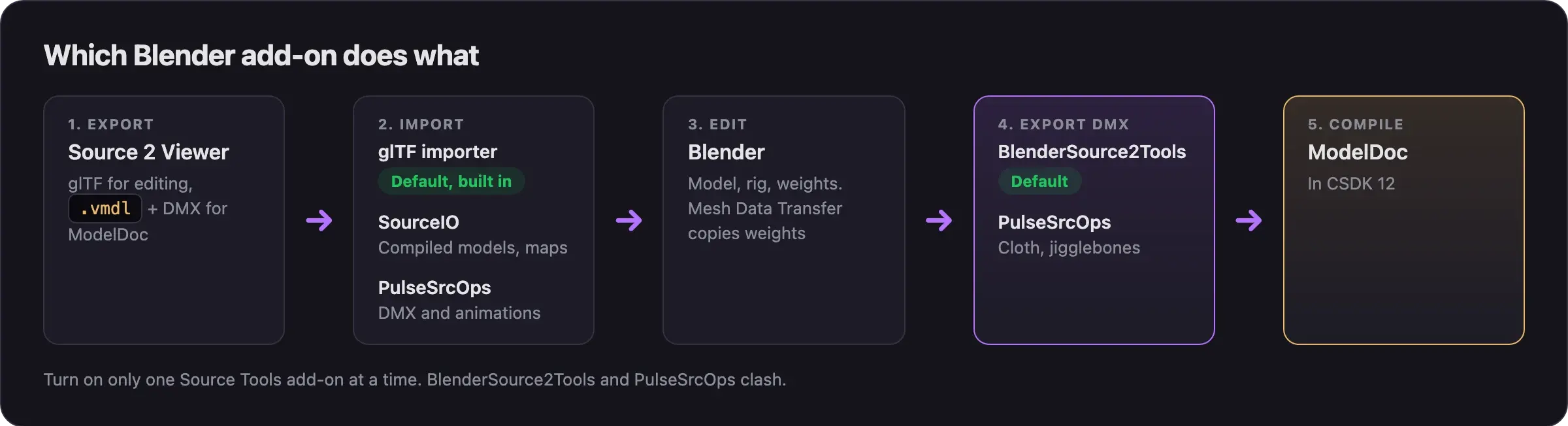
| Tool | Job | Blender version | License |
|---|---|---|---|
| Built-in glTF importer | Imports Source 2 Viewer glTF exports. The default route. | Ships with Blender | Free |
| BlenderSource2Tools (Fuji fork) | Exports DMX for ModelDoc. Every model guide uses it. | 4.4 and newer, tested on 5.0 | Fork of a GPL add-on |
| SourceIO | Imports compiled models, materials, and maps from the game | 4.5 and newer (5.0 from 5.5.4) | MIT |
| PulseSrcOps | Imports and exports DMX, with animations, cloth, and jigglebones | 4.5 and newer | GPL-3.0 |
| Mesh Data Transfer | Copies weights and shape keys between meshes | 4.2 and newer | GPL-3.0 |
All of them are free.
Which Blender version
- The current Blender is 5.2.2 LTS, from 2026-09-15.
- Fuji's guide, by the BlenderSource2Tools maintainer, uses Blender 5.0. Use a 5.x version for new projects.
- Nobody has tested BlenderSource2Tools on 5.2 yet. If its export fails there, try 5.0.
- For cloth, Pugzilla recommends Blender 4.2 with the Fuji fork. On Blender 4.1 to 4.3.2, install BlenderSource2Tools tag
3.3.1_2c. - Ignore older tutorials that tell you to use Blender 2.93 for cloth. That advice is from 2024.
Install an add-on
- Download the add-on's zip from its release page.
- In Blender, open Edit, then Preferences, then Add-ons.
- Open the dropdown menu and choose Install from Disk.
- Pick the zip. Blender installs the add-on and turns it on.
BlenderSource2Tools, PulseSrcOps, and the original Blender Source Tools share setting names, so they clash. Turn the others off before you turn one on.
BlenderSource2Tools (Fuji fork)
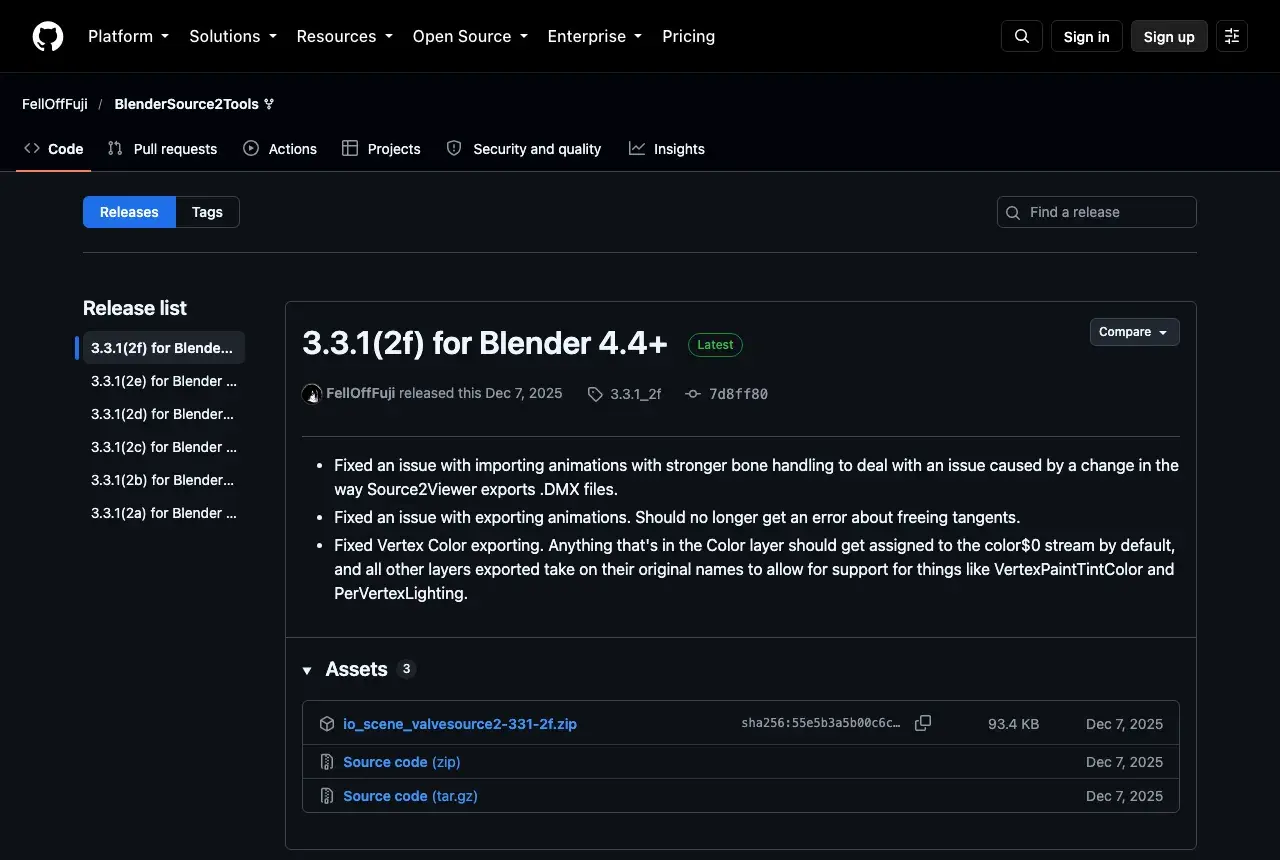
BlenderSource2ToolsThe DMX exporter that every Deadlock model guide uses. By FellOffFuji.
RecommendedFellOffFuji's fork adds what Source 2 needs: cloth vertex maps, bone axis fixes, and model scaling.
- Get it: on the releases page, under Assets, download the
io_scene_valvesource2zip, not Source code. - Latest: 3.3.1_2f, from 2025-12-07. It fixed animation import after a Source 2 Viewer DMX change, plus animation and vertex color export.
- Back up your work. Its readme calls it experimental and warns it may corrupt
.blendfiles.
Export settings the guides use, in Scene Properties, then Source Engine Export:
| Name | Description |
|---|---|
| DMX version | Binary 9 and Model 22 (ModelDoc) |
| Export path | Your addon's content folder |
SourceIO
SourceIOAn importer for compiled game files. By REDxEYE.
It reads .vmdl_c models, materials, textures, and maps without a glTF export first. It does not export.
- Version: use release 5.5.4 or newer for Blender 5.x.
- Import: File, then Import, then Source Engine Assets, then the Source 2 model importer.
- After import: delete the extra detail levels (
lod1,lod2,lod3). SourceIO brings them all in at once, so the model flickers. - Missing parts: it can skip parts colored by vertex color only, such as hair, eyes, and faces. If parts come in white or missing, use the glTF route instead.
Neutraldrift's video shows the full SourceIO import, including the mount and scale settings:
PulseSrcOps
PulseSrcOpsA character-focused fork of Blender Source Tools. By ToppiOfficial.
It imports DMX files that Source 2 Viewer decompiles, including animations. It also exports cloth proxies, jigglebones, hitboxes, and attachments, and it updates itself.
- Version: 2.5.0 came out on 2026-10-06.
- Use it for: animation work. The Deadlock Modding Notes animation guide names it as the tool that imports DMX animations into Blender 4.5 and newer.
- For plain model exports, stay with BlenderSource2Tools until someone tests PulseSrcOps exports in ModelDoc.
Mesh Data Transfer
Mesh Data TransferA weight transfer add-on on Blender Extensions. By Maurizio Memoli.
FreeCopies vertex groups (weights), shape keys, and UVs from one mesh to another, even when their shapes differ. Model guides use it to move a hero's weights onto a new model.
Some guides link an older Gumroad version. Use the Blender Extensions version instead.
Skip these
- The original Blender Source Tools by Artfunkel. The Deadlock forks build on it, but it lacks their Source 2 fixes.
- Two Source Tools add-ons at once. See the warning above.
Next steps
Open an exported hero or prop in Blender at the right size and facing.
Fit your character to a hero's skeleton and export DMX files.
Swap one hero animation clip for your own motion.
Credits
This guide is based on the work of these creators. Check out their original guides.
- Video: How To import Deadlock Models into Blender with Source IO and Souce2viewer by Neutraldrift.
- Video: (Read Desc) Deadlock - General Model Swap Steps by Pugzilla.
- Guide: From Start to Finish (Fuji's Asset Replacement Guide) by Fuji (FellOffFuji).
- Guide: Neutral's General Guide for Modding Deadlock by Neutraldrift.
- Guide: Custom animation VmClip guide from Deadlock Modding Notes.
- Tools: BlenderSource2Tools by FellOffFuji, SourceIO by REDxEYE, PulseSrcOps by ToppiOfficial, and Mesh Data Transfer by Maurizio Memoli.