
Deadlock file types
A plain-English list of the file types you meet in Deadlock modding: what each one holds, which tool makes it, and whether you ship it.
Deadlock modding uses a lot of file endings. This page lists the ones you will meet: what each holds, which tool makes it, and whether it goes in your mod. New to VPKs and file paths? Read How Deadlock mods work first.
What you need
Nothing to install. Keep this page open as a reference.

Source 2 Viewer shows these files inside the game's pak01_dir.vpk, and decompiles them.
Source files and compiled files
Every file inside the game's VPK is compiled. Its name ends in _c, like .vmat_c. You never edit a _c file. You decompile it with Source 2 Viewer, edit the source file, and compile it again with CSDK 12.
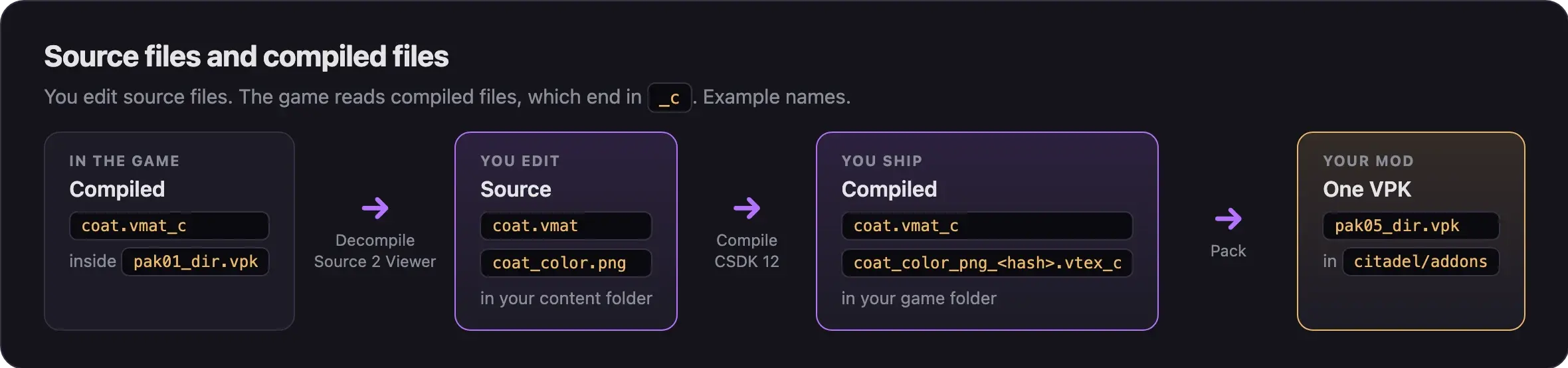
- You edit source files in your addon's content folder.
- CSDK 12 writes compiled files to your addon's game folder.
- Your mod holds only the compiled files you changed, at the game's exact paths.
The In your mod? column below tells you what to pack. "Yes" means the compiled _c file, and only if you changed it.
Models and animation
| File | What it holds | Made with | In your mod? |
|---|---|---|---|
.vmdl → .vmdl_c | A model: meshes, skeleton, attachments, hitboxes, detail levels, material groups | ModelDoc | Yes, with the original file name |
.dmx, .fbx | A mesh exported from Blender. ModelDoc builds it into the .vmdl_c | Blender | No |
.gltf, .glb | A model exported to open in Blender. Not a game file | Source 2 Viewer | No |
.vnmclip → .vnmclip_c | One animation clip | ModelDoc | Yes, if you replace that animation |
.vnmskel → .vnmskel_c | The skeleton a hero's animations use | CSDK 12 | No. It breaks animations after updates |
.vnmgraph_c | An animation graph that picks which clip plays | No public tool | No |
Hero models live in models/heroes_wip/ or models/heroes_staging/, under Valve's codenames. Look them up in Hero names and file paths.
Materials and textures
| File | What it holds | Made with | In your mod? |
|---|---|---|---|
.vmat → .vmat_c | A material: the shader, its settings, and which textures it uses | Material Editor | Yes |
.png, .tga, .psd, .jpg → .vtex_c | A texture, compiled along with the material that uses it | Image editor, then CSDK 12 | Yes, together with its .vmat_c |
.vtex | Optional compile settings for one texture | Text editor | No |
Compiled texture names add the image type and a hash. abrams_coat_color.png becomes something like abrams_coat_color_png_63291cfb.vtex_c. So you cannot drop a new image over an old name. Recompile the material and ship it with its new .vtex_c files.
Sounds
| File | What it holds | Made with | In your mod? |
|---|---|---|---|
.wav, .mp3 → .vsnd_c | One sound | Audio editor, then CSDK 12 | Yes |
.vsndevts → .vsndevts_c | Sound events: which sound files an event plays, and how loud or long | Text editor | Only if you change an event. It replaces the hero's whole file |
.vrr_c | Talker rules: which voice line plays for which game event | Comes with the game | Not for a voice swap. Read it to find the line you want |
encoding.txt | Loop points and compression for the sounds next to it | Text editor | No. CSDK 12 reads it while compiling |
Hero sound events are in soundevents/hero/, and the sounds in sounds/abilities/, sounds/vo/, and sounds/music/. See Replace a sound.
Particles
| File | What it holds | Made with | In your mod? |
|---|---|---|---|
.vpcf → .vpcf_c | A particle effect, such as an ability's sparks or glow | Particle Editor | Yes |
Hero ability effects are in particles/abilities/. Some effects get their color from a texture in materials/particle/, which follows the material rules above.
UI (Panorama)
Deadlock's interface is called Panorama. Its files live in panorama/.
| File | What it holds | Made with | In your mod? |
|---|---|---|---|
.xml → .vxml_c | A layout: which panels a screen has | Text editor | Yes, for HUD edits |
.css → .vcss_c | Styles: colors, sizes, and positions | Text editor | Yes, for HUD edits |
.js → .vjs_c | Interface scripts | Text editor | Only if your HUD mod needs scripts |
.png, .psd → .vtex_c | Interface images, such as portraits and item art | Image editor, then CSDK 12 | Yes |
.svg → .vsvg_c | Vector images, such as hero name art | Vector editor | Yes |
image_compiler.vdata, .vpdi | A list of images for CSDK 12 to compile in one go | Text editor | No. Ship only the compiled images |
.vts_c | Six compiled files in panorama/scripts/. Probably scripts, not confirmed | Comes with the game | No |
Interface images keep the image type in their name, with no hash: haze_card_psd.vtex_c. See Replace portraits, icons, and item art.
Game data (never ship)
| File | What it holds | Made with | In your mod? |
|---|---|---|---|
.vdata → .vdata_c | Game data in scripts/: hero and ability stats, items, and settings | Text editor | Never |
Game data changes with every update. A mod that ships an old copy can crash the game, keep a new hero locked, or freeze hero stats at old values. It also changes gameplay, so it is not a cosmetic mod.
The .vdata ending is also used for tool lists, such as image_compiler.vdata. Those stay out of your mod too.
Maps
| File | What it holds | Made with | In your mod? |
|---|---|---|---|
.vmap → .vmap_c | A map. Each map is its own VPK in game/citadel/maps/ | Hammer, which needs the full game files | Not in addons. A map is its own VPK |
The hero select, shop, and end screens are small maps in maps/ui/. Some skins replace these to change poses. See Hero select, shop, and end screen poses. Custom maps do not work in Valve matches. See Play custom maps.
Other files you will see
| File | What it is | In your mod? |
|---|---|---|
.vpk | A package of game files. pak01_dir.vpk is the index, and pak01_000.vpk and up hold the data | Your mod is one: pakNN_dir.vpk |
gameinfo.gi | Tells the game which folders to read. Edit only its SearchPaths block, on your own PC | Never |
.vcd_c | Choreography scenes in scenes/ | No. Mods do not use them so far |
Next steps
Put your compiled files into a mod.
Credits
This guide is based on the work of these creators. Check out their original guides.
- Guide: Asset Structure from Deadlock Modding Notes.
- Docs: Format Support and Export Fidelity by the ValveResourceFormat team.
- Guide: File Formats by the Source2Wiki contributors.
- Data: GameTracking-Deadlock by SteamTracking, for the file names and folders in build 6779.
- Guide: From Start to Finish (Fuji's Asset Replacement Guide) by Fuji (FellOffFuji).