
Play custom maps
Download a community map, load it on your own PC from the console, and remove it again before you play normal matches.
Play a community-made map on your own PC. You put the map file in the right folder, load it from the console, and take it out before normal matches.
What you need
A map mod
downloaded or your ownYou load maps from the dev console. Test your mod in game shows how to turn it on.
What custom maps exist
Valve has released no map tools for Deadlock, and the game has no Steam Workshop. Community maps are VPK files, and only a few dozen exist as of October 2026.
| Type | Examples |
|---|---|
| Movement training | Jump and parkour maps, such as Jump School Map by 1Lomi. |
| Other lane maps | Smaller 6v6 maps, such as dl_express by BestNameExisting and dl_harbor by OhSeismic (work in progress). |
| Fun maps | Party modes, such as kart racing. |
This guide covers playing alone. Playing a custom map with friends needs a community server or console tricks, and this wiki does not cover them.
Want to build your own map? Map makers use Hammer from CSDK 12 with the full game files. This wiki does not cover mapping yet.
Play a map
Install a map
- Pick a map mod you downloaded, or one you made.
- Unpack it if it came as an archive, and find the
.vpkfile. A map never needs an.exefile. What's allowed and how to stay safe shows what a real mod looks like. - In Steam, right-click Deadlock and choose Manage, then Browse local files.
- Open
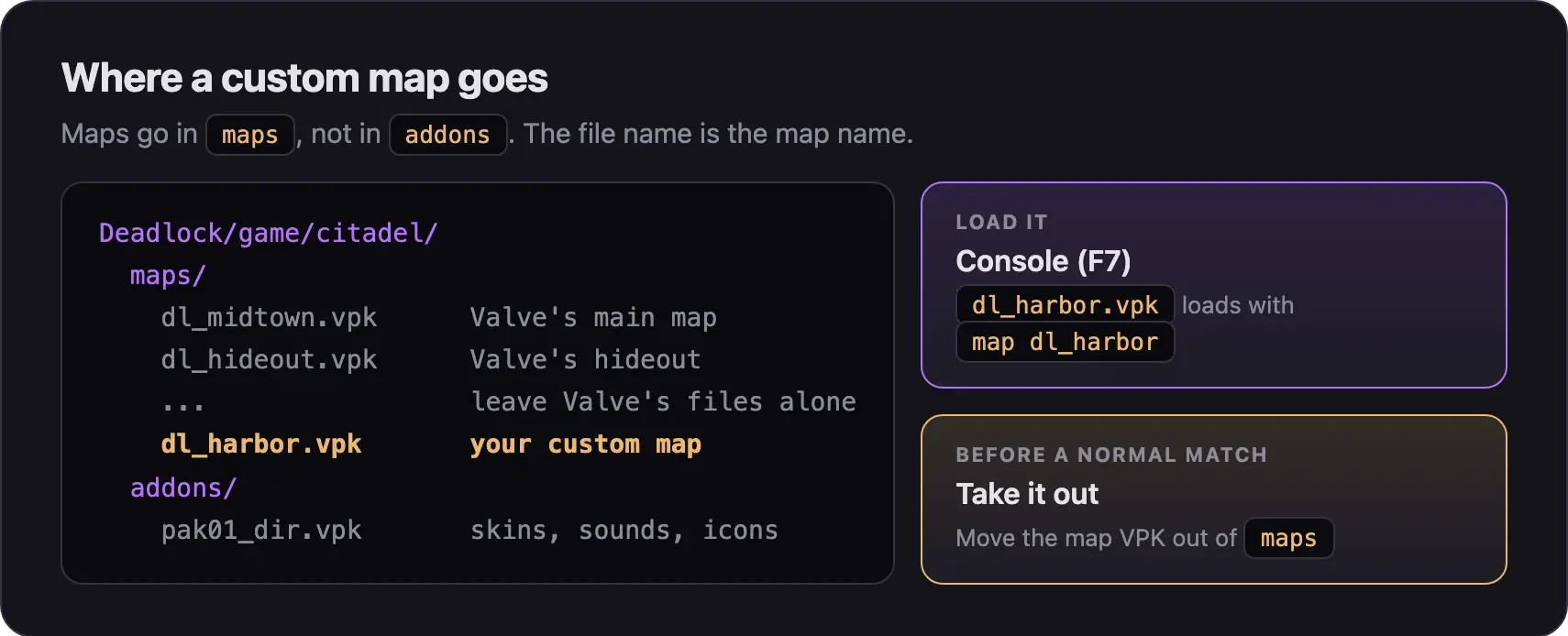
game/citadel/maps/. Valve's own maps are in this folder too. - Copy the map
.vpkintomaps. Do not put it inaddons. - Keep the file name as it is. The file name is the map name you type later.
Leave Valve's map files alone. Some maps install through Deadlock Mod Manager instead. Follow the map's page if it says so.
Load it from the console
- Start Deadlock.
- Press F7 to open the console.
- Type
mapand the file name without.vpk, then press Enter. Fordl_harbor.vpk, typemap dl_harbor. - Pick your team and hero.
Read the map's page before you play. Some maps need extra console settings to work. Some, like Jump School, need the map command twice.
Remove it before matchmaking
Custom maps don't work in Valve's matches. With a map installed, the normal map may fail to load, or you may not get into matchmaking. One map author also warns of desyncs and crashes.
- Close Deadlock.
- Move your custom map VPKs out of
game/citadel/maps/into a folder outside the Deadlock folder. - Start Deadlock and queue.
To play a map again later, copy it back in.
It warns you before launch when map mods are installed. Click Disable Map Mods & Launch before a normal match.
Common map problems
Next steps

Manage your mods in one app. It warns you before a normal match when map mods are installed.
Credits
This guide is based on the work of these creators. Check out their original maps and guides.
- Map: dl_harbor (WIP) by OhSeismic.
- Map: dl_express by BestNameExisting.
- Map: Jump School Map by 1Lomi.
- Guide: Hosting a Local Listen Server from Deadlock Modding Notes.
- Tool: Deadlock Mod Manager by Stormix and contributors.
- Data: GameTracking-Deadlock by SteamTracking, for Valve's map files.