
Mods not loading
Mods not showing up in game? Check gameinfo.gi, the addons folder, file names, and load order, one step at a time.
The game starts, but your mods do not show. Work through the checks below in order. Most of the time the cause is a game update or a file name. This page works for mods you installed by hand or with Deadlock Mod Manager.
Does the game crash instead? Go to Crashes, launch errors, and matchmaking blocks.
What you need

To open your Deadlock folder, right-click Deadlock in Steam and choose Manage, then Browse local files. Source 2 Viewer opens a mod so you can see the files inside it.
Quick checklist
Close Deadlock and your mod manager first. Then check:
game/citadel/gameinfo.gistill has the lineGame citadel/addons.- Every mod sits straight inside
game/citadel/addons/, not in a subfolder. - Every mod is named
pak01_dir.vpktopak99_dir.vpk, with two digits. - No two mods share a number.
- No mod with a lower number changes the same files.
- In a mod manager, the mod is switched on.
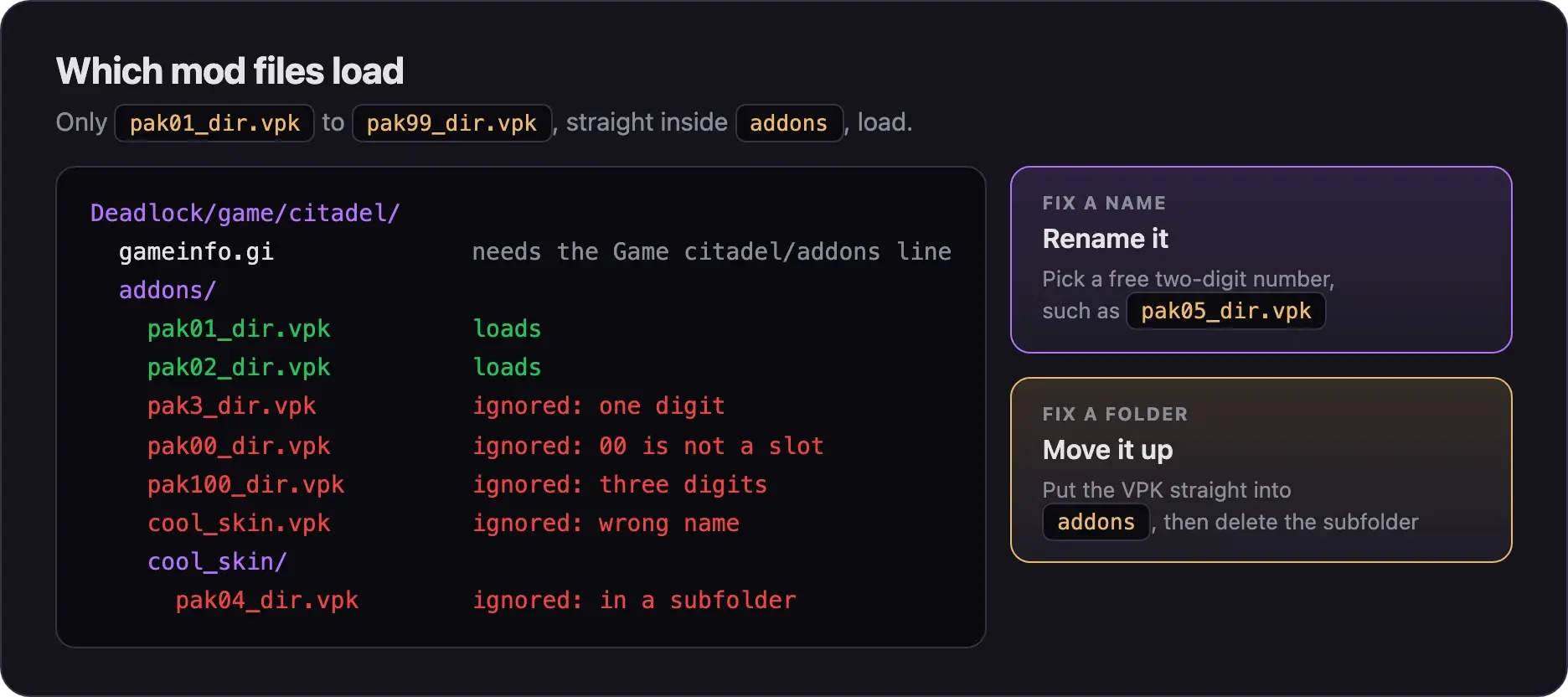
The fixes below explain each check. Open the one that matches what you see.
gameinfo.gi problems
File names and folders
Mods that clash or break
Mod manager problems
This short video by SNIPZTEA covers duplicate numbers, a missing addons folder, and mods that are not switched on.
It was made in October 2025, before the City Never Sleeps update. Deadlock Mod Manager looks different now. Get it from deadlockmods.app.
Still stuck: test half your mods
If every check passes and a mod still does not show, another mod may be in the way. Find it by halves.
- Close Deadlock.
- Move half of your VPKs out of
addonsinto a folder on your desktop. Keep the mod you are testing. - Start the game and check the mod.
- If it shows now, the blocker is in the half you moved. If not, it is in the half you kept.
- Keep halving that group until one mod is left.
With Deadlock Mod Manager, switch mods off in the app instead of moving files.
Next steps

Fixes for the app itself, such as antivirus warnings and stuck downloads.
Redo the setup from scratch.
Credits
This guide is based on the work of these creators. Check out their original guides.
- Video: How to Install Mods On Deadlock The EASIEST Way (Mod Manager) by SNIPZTEA.
- Guide: Installing Mods from Deadlock Modding Notes.
- Guide: Troubleshooting Guide and Mods Library and Files from the Deadlock Mod Manager docs.
- Q&A: Files error on GameBanana, answered by TheLastFriendly.
- Code: Mount localized UI assets when mods are enabled by the Deadlock Mod Manager contributors, which explains the
Game_UILanguagechange.